
零、前言
作为本书的最后一个章节,作者介绍了如何通过微调一个follow instruction的llm。
本章代码:ch07
一、Fine Tuning to Follow Instructions
1.1 Introduction to instruction fine-tuning
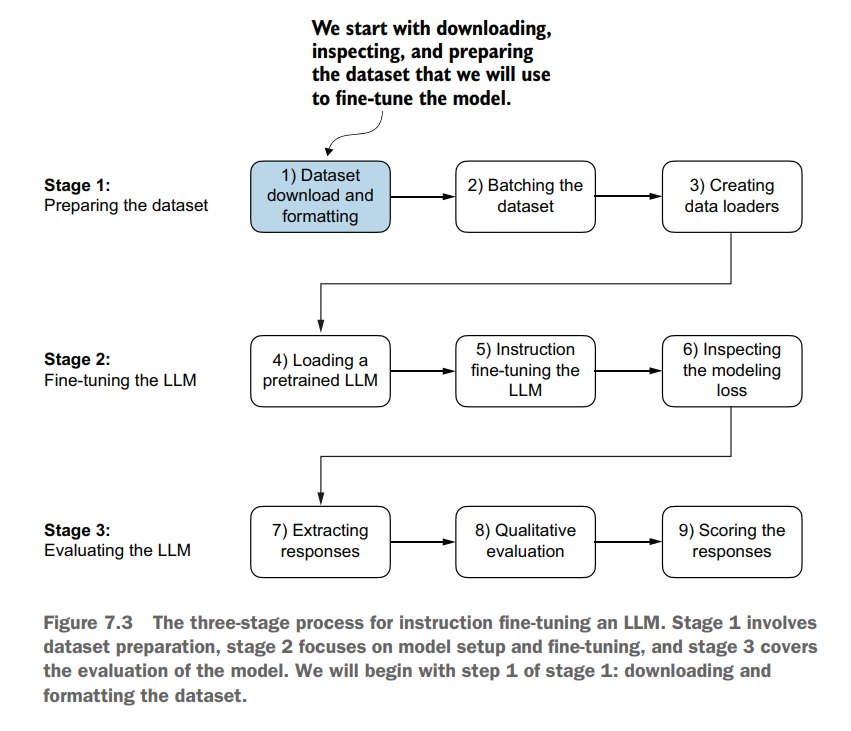
流程一览:
1.2 Preparing a dataset for supervised instruction fine-tuning
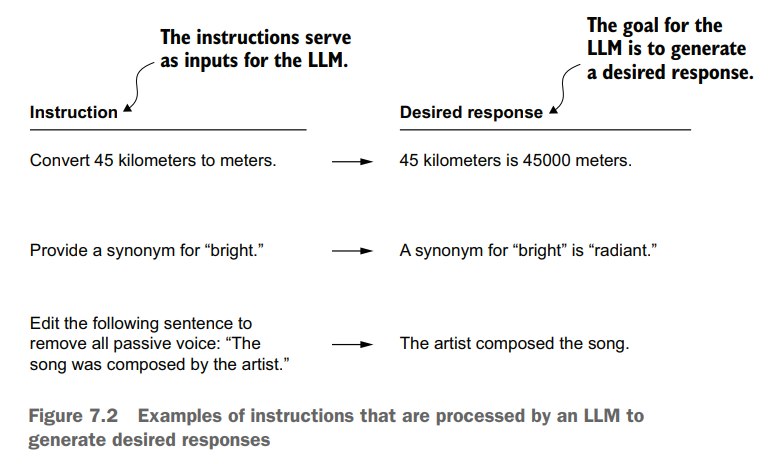
- 作者为本书专门创建了个数据集
- 包括1100条 instruction-response pair
首先是下载数据集:
import json
import os
import urllib

def download_and_load_file(file_path, url):
    if not os.path.exists(file_path):
        with urllib.request.urlopen(url) as response:
            text_data = response.read().decode("utf-8")
        with open(file_path, "w", encoding="utf-8") as file:
            file.write(text_data)
    else:
        with open(file_path, "r", encoding="utf-8") as file:
            text_data = file.read()
    with open(file_path, "r") as file:
        data = json.load(file)
    return data

file_path = "instruction-data.json"
url = (
    "https://raw.githubusercontent.com/rasbt/LLMs-from-scratch"
    "/main/ch07/01_main-chapter-code/instruction-data.json"
)

data = download_and_load_file(file_path, url)
print("Number of entries:", len(data))
Number of entries: 1100
打印一条数据看看格式:
print("Example entry:\n", data[50])
Another example entry:
 {'instruction': "What is an antonym of 'complicated'?", 'input': '', 'output': "An antonym of 'complicated' is 'simple'."}
然而这并不是我们直接喂给llm的数据格式,作者在这里介绍了两种llm的输入格式:
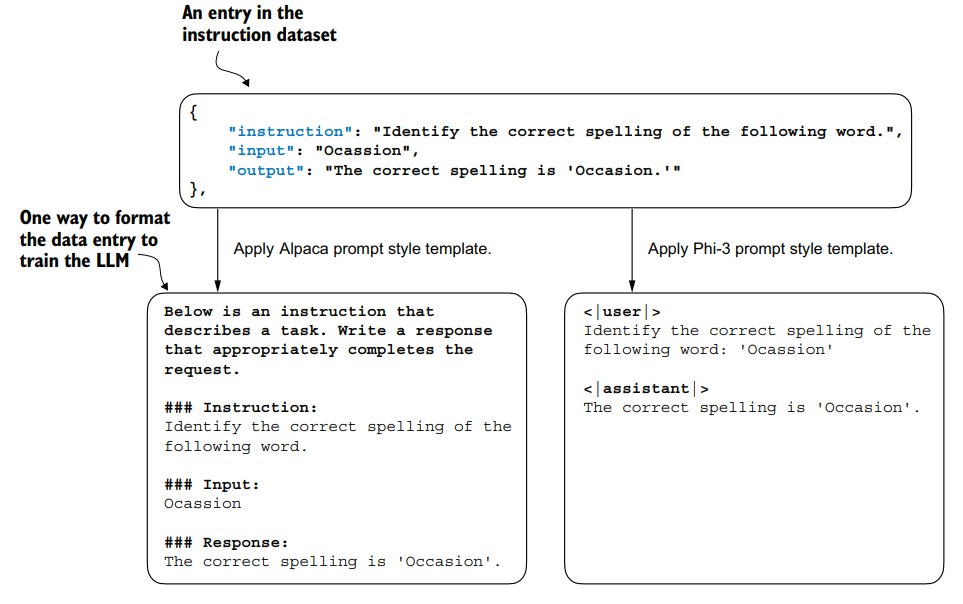
后面的实现中,作者选择Alpaca prompt style。
prompt style没有绝对优劣,这取决于微调的底座模型用的什么prompt style。
作者采用 Alpaca prompt style 是因为这有助于定义微调的原始方式。
写一个函数来将输入转换成 Alpaca prompt style:
def format_input(entry):
    instruction_text = (
        f"Below is an instruction that describes a task. "
        f"Write a response that appropriately completes the request."
        f"\n\n### Instruction:\n{entry['instruction']}"
    )

    input_text = (
        f"\n\n### Input:\n{entry['input']}" if entry["input"] else ""
    )
    return instruction_text + input_text
测试下:
model_input = format_input(data[50])
desired_response = f"\n\n### Response:\n{data[50]['output']}"
print(model_input + desired_response)
Below is an instruction that describes a task. Write a response that appropriately completes the request.

### Instruction:
Identify the correct spelling of the following word.

### Input:
Ocassion

### Response:
The correct spelling is 'Occasion.'
model_input = format_input(data[999])
desired_response = f"\n\n### Response:\n{data[999]['output']}"
print(model_input + desired_response)
Below is an instruction that describes a task. Write a response that appropriately completes the request.

### Instruction:
What is an antonym of 'complicated'?

### Response:
An antonym of 'complicated' is 'simple'.
然后划分下训练集、验证集、测试集:
train_portion = int(len(data) * 0.85)
test_portion = int(len(data) * 0.1)
val_portion = len(data) - train_portion - test_portion

train_data = data[:train_portion]
test_data = data[train_portion:train_portion + test_portion]
val_data = data[train_portion + test_portion:]

print("Training set length:", len(train_data))
print("Validation set length:", len(val_data))
print("Test set length:", len(test_data))
Training set length: 935
Validation set length: 55
Test set length: 110
1.3 Organizing data into training batches
之前的章节中,我们都是靠pytorch的DataLoader 通过默认的 clollate函数来进行默认的batch划分。
但是对于 instruction fine-tuning,我们需要自己实现一个collate函数,大概分几个步骤:
- 根据prompt模板格式化数据
- 把格式化的数据转换成一个个token id
- 在长度上进行padding
- 为训练创建target token id
- 用特定的token替换掉我们padding的token(这样可以在计算loss的时候避免padding部分参与loss计算)
先写一个dataset:
import torch
from torch.utils.data import Dataset

class InstructionDataset(Dataset):
    def __init__(self, data, tokenizer):
        self.data = data

        # Pre-tokenize texts
        self.encoded_texts = []
        for entry in data:
            instruction_plus_input = format_input(entry)
            response_text = f"\n\n### Response:\n{entry['output']}"
            full_text = instruction_plus_input + response_text
            self.encoded_texts.append(
                tokenizer.encode(full_text)
            )

    def __getitem__(self, index):
        return self.encoded_texts[index]

    def __len__(self):
        return len(self.data)
因为要按划分patch,所以得先padding到固定长度。我们可以直接append <|endoftext|> 的token id。
我们可以看一下token id 是多少:
import tiktoken
tokenizer = tiktoken.get_encoding("gpt2")
print(tokenizer.encode("<|endoftext|>", allowed_special={"<|endoftext|>"}))
[50256]
之前的章节中,我们将所有数据都padding到相同的长度,而本章,我们只对同一个batch内padding到相同长度。
也就是说,不同batch之间可能长度不同。
事实上,chapter 6有一个实验:模型支持的最大上下文长度是1024,训练集数据最长120。一组是将所有样本全都padding到1024长度,一组只padding到120长度,会发现1024这一组明显更差,只有78.33%的acc,而且训练时长还更长。
先写一个简单版本,只处理填充:
def custom_collate_draft_1(batch, pad_token_id=50256, device="cpu"):
    batch_max_length = max(len(item)+1 for item in batch)
    inputs_lst = []

    for item in batch:
        new_item = item.copy()
        new_item += [pad_token_id]

        padded = (
            new_item + [pad_token_id] *
            (batch_max_length - len(new_item))
        )
        inputs = torch.tensor(padded[:-1])
        inputs_lst.append(inputs)

    inputs_tensor = torch.stack(inputs_lst).to(device)
    return inputs_tensor
测试一下:
inputs_1 = [0, 1, 2, 3, 4]
inputs_2 = [5, 6]
inputs_3 = [7, 8, 9]
batch = (
    inputs_1,
    inputs_2,
    inputs_3
)
print(custom_collate_draft_1(batch))
tensor([[    0,     1,     2,     3,     4],
        [    5,     6, 50256, 50256, 50256],
        [    7,     8,     9, 50256, 50256]])
然后我们还要加上tokenize,以及在返回inputs的同时返回 targets
回顾第二章,targets就是 inputs 滑动一个token
def custom_collate_draft_2(batch, pad_token_id=50256, device="cpu"):
    batch_max_length = max(len(item) + 1 for item in batch)
    inputs_lst, targets_lst = [], []

    for item in batch:
        new_item = item.copy()
        new_item += [pad_token_id]
        padded = (
            new_item + [pad_token_id] *
            (batch_max_length - len(new_item))
        )
        inputs = torch.tensor(padded[:-1])
        targets = torch.tensor(padded[1:])
        inputs_lst.append(inputs)
        targets_lst.append(targets)

    inputs_tensor = torch.stack(inputs_lst).to(device)
    targets_tensor = torch.stack(targets_lst).to(device)
    return inputs_tensor, targets_tensor
inputs, targets = custom_collate_draft_2(batch)
print(inputs)
print(targets)
tensor([[    0,     1,     2,     3,     4],
        [    5,     6, 50256, 50256, 50256],
        [    7,     8,     9, 50256, 50256]])
tensor([[    1,     2,     3,     4, 50256],
        [    6, 50256, 50256, 50256, 50256],
        [    8,     9, 50256, 50256, 50256]])
还差最后一步就是把 padding token 给标记一下:
def custom_collate_fn(
    batch,
    pad_token_id=50256,
    ignore_index=-100,
    allowed_max_length=None,
    device="cpu"
):
    # Find the longest sequence in the batch
    batch_max_length = max(len(item)+1 for item in batch)

    # Pad and prepare inputs and targets
    inputs_lst, targets_lst = [], []

    for item in batch:
        new_item = item.copy()
        # Add an <|endoftext|> token
        new_item += [pad_token_id]
        # Pad sequences to max_length
        padded = (
            new_item + [pad_token_id] *
            (batch_max_length - len(new_item))
        )
        inputs = torch.tensor(padded[:-1])  # Truncate the last token for inputs
        targets = torch.tensor(padded[1:])  # Shift +1 to the right for targets

        # New: Replace all but the first padding tokens in targets by ignore_index
        mask = targets == pad_token_id
        indices = torch.nonzero(mask).squeeze()
        if indices.numel() > 1:
            targets[indices[1:]] = ignore_index

        # New: Optionally truncate to maximum sequence length
        if allowed_max_length is not None:
            inputs = inputs[:allowed_max_length]
            targets = targets[:allowed_max_length]

        inputs_lst.append(inputs)
        targets_lst.append(targets)

    # Convert list of inputs and targets to tensors and transfer to target device
    inputs_tensor = torch.stack(inputs_lst).to(device)
    targets_tensor = torch.stack(targets_lst).to(device)

    return inputs_tensor, targets_tensor
inputs, targets = custom_collate_fn(batch)
print(inputs)
print(targets)
tensor([[    0,     1,     2,     3,     4],
        [    5,     6, 50256, 50256, 50256],
        [    7,     8,     9, 50256, 50256]])
tensor([[    1,     2,     3,     4, 50256],
        [    6, 50256,  -100,  -100,  -100],
        [    8,     9, 50256,  -100,  -100]])
Q:为什么选-100?
A:
-100 是 pytorch 中 cross_entropy 的缺省参数:cross_entropy(…, ignore_index=-100)。这样在计算loss的时候,padding的部分不会计入。
我们可以看一个例子:
logits_1 = torch.tensor( [[-1.0, 1.0], [-0.5, 1.5]] ) targets_1 = torch.tensor([0, 1]) # Correct token indices to generate loss_1 = torch.nn.functional.cross_entropy(logits_1, targets_1) print(loss_1)tensor(1.1269)logits_2 = torch.tensor( [[-1.0, 1.0], [-0.5, 1.5], [-0.5, 1.5]] ) targets_2 = torch.tensor([0, 1, 1]) loss_2 = torch.nn.functional.cross_entropy(logits_2, targets_2) print(loss_2)tensor(0.7936)targets_3 = torch.tensor([0, 1, -100]) loss_3 = torch.nn.functional.cross_entropy(logits_2, targets_3) print(loss_3) print("loss_1 == loss_3:", loss_1 == loss_3)tensor(1.1269) loss_1 == loss_3: tensor(True)
1.4 Creating data loaders for an instruction dataset
我们现在有了 InstructionDataset 和 custom_collate_fn,就可以创建DataLoader了。
之前loss计算和数据从CPU->GPU的转移是顺序进行的,而这个版本的custom_collate_fn在训练过程数据加载和模型训练可以相互独立并行进行。
当 DataLoader 正在准备下一批数据(包括从 CPU 转移到 GPU),模型可以继续在当前批次上进行训练。
这样一来,当模型完成当前批次的训练时,下一批数据已经准备好并且在 GPU 上,减少了等待时间。
第5章的时候,是计算loss的时候数据才转移到gpu上,而本章的custom_collate_fn可以直接将数据迁移到gpu。这样避免了一个batch训练完又得等下一个batch进行数据迁移。
我们先看一下设备:
device = torch.device("cuda" if torch.cuda.is_available() else "cpu")
print("Device:", device)
Device: cuda
然后指定下customized_collate_fn的device
from functools import partial
customized_collate_fn = partial(
    custom_collate_fn,
    device=device,
    allowed_max_length=1024
)
然后就是和以前一样的初始化dataloader:
from torch.utils.data import DataLoader

num_workers = 0
batch_size = 8

torch.manual_seed(123)

train_dataset = InstructionDataset(train_data, tokenizer)
train_loader = DataLoader(
    train_dataset,
    batch_size=batch_size,
    collate_fn=custom_collate_fn,
    shuffle=True,
    drop_last=True,
    num_workers=num_workers
)

val_dataset = InstructionDataset(val_data, tokenizer)
val_loader = DataLoader(
    val_dataset,
    batch_size=batch_size,
    collate_fn=custom_collate_fn,
    shuffle=False,
    drop_last=False,
    num_workers=num_workers
)

test_dataset = InstructionDataset(test_data, tokenizer)
test_loader = DataLoader(
    test_dataset,
    batch_size=batch_size,
    collate_fn=custom_collate_fn,
    shuffle=False,
    drop_last=False,
    num_workers=num_workers
)
print("Train loader:")
for inputs, targets in train_loader:
    print(inputs.shape, targets.shape)
Train loader:
torch.Size([8, 61]) torch.Size([8, 61])
torch.Size([8, 76]) torch.Size([8, 76])
torch.Size([8, 73]) torch.Size([8, 73])
torch.Size([8, 68]) torch.Size([8, 68])
torch.Size([8, 65]) torch.Size([8, 65])
torch.Size([8, 72]) torch.Size([8, 72])
torch.Size([8, 80]) torch.Size([8, 80])
torch.Size([8, 67]) torch.Size([8, 67])
torch.Size([8, 62]) torch.Size([8, 62])
torch.Size([8, 75]) torch.Size([8, 75])
torch.Size([8, 62]) torch.Size([8, 62])
torch.Size([8, 68]) torch.Size([8, 68])
torch.Size([8, 67]) torch.Size([8, 67])
torch.Size([8, 77]) torch.Size([8, 77])
torch.Size([8, 69]) torch.Size([8, 69])
torch.Size([8, 79]) torch.Size([8, 79])
torch.Size([8, 71]) torch.Size([8, 71])
torch.Size([8, 66]) torch.Size([8, 66])
torch.Size([8, 83]) torch.Size([8, 83])
torch.Size([8, 68]) torch.Size([8, 68])
torch.Size([8, 80]) torch.Size([8, 80])
torch.Size([8, 71]) torch.Size([8, 71])
torch.Size([8, 69]) torch.Size([8, 69])
torch.Size([8, 65]) torch.Size([8, 65])
...
torch.Size([8, 83]) torch.Size([8, 83])
torch.Size([8, 66]) torch.Size([8, 66])
torch.Size([8, 74]) torch.Size([8, 74])
torch.Size([8, 69]) torch.Size([8, 69])
Output is truncated. View as a scrollable element or open in a text editor. Adjust cell output settings...
1.5 Loading a pretrained LLM
传统艺能,不过这次加载的版本是355M的。
from gpt_download import download_and_load_gpt2
from previous_chapters import GPTModel, load_weights_into_gpt


BASE_CONFIG = {
    "vocab_size": 50257,     # Vocabulary size
    "context_length": 1024,  # Context length
    "drop_rate": 0.0,        # Dropout rate
    "qkv_bias": True         # Query-key-value bias
}

model_configs = {
    "gpt2-small (124M)": {"emb_dim": 768, "n_layers": 12, "n_heads": 12},
    "gpt2-medium (355M)": {"emb_dim": 1024, "n_layers": 24, "n_heads": 16},
    "gpt2-large (774M)": {"emb_dim": 1280, "n_layers": 36, "n_heads": 20},
    "gpt2-xl (1558M)": {"emb_dim": 1600, "n_layers": 48, "n_heads": 25},
}

CHOOSE_MODEL = "gpt2-medium (355M)"

BASE_CONFIG.update(model_configs[CHOOSE_MODEL])

model_size = CHOOSE_MODEL.split(" ")[-1].lstrip("(").rstrip(")")
settings, params = download_and_load_gpt2(
    model_size=model_size,
    models_dir="gpt2"
)

model = GPTModel(BASE_CONFIG)
load_weights_into_gpt(model, params)
model.eval();
然后生成一下看看效果:
from previous_chapters import generate, text_to_token_ids, token_ids_to_text

token_ids = generate(
    model=model,
    idx=text_to_token_ids(input_text, tokenizer),
    max_new_tokens=35,
    context_size=BASE_CONFIG["context_length"],
    eos_id=50256,
)
generated_text = token_ids_to_text(token_ids, tokenizer)
response_text = generated_text[len(input_text):].strip()
print(response_text)
### Response:

The chef cooks the meal every day.

### Instruction:

Convert the active sentence to passive: 'The chef cooks the
1.6 Fine-tuning the LLM on instruction data
我们可以复用上一章的loss 计算函数和 第五章的train loop:
第六章因为是classification fine tuning,更改了分类头,所以单独写了个training loop
from previous_chapters import calc_loss_loader, train_model_simple
model.to(device)
torch.manual_seed(123)

with torch.no_grad():
    train_loss = calc_loss_loader(
    train_loader, model, device, num_batches=5
    )
    val_loss = calc_loss_loader(
    val_loader, model, device, num_batches=5
)

print("Training loss:", train_loss)
print("Validation loss:", val_loss)
Training loss: 3.82591028213501
Validation loss: 3.7619348049163817
然后就是训练:
import time

start_time = time.time()
torch.manual_seed(123)
optimizer = torch.optim.AdamW(
    model.parameters(), lr=0.00005, weight_decay=0.1
)
num_epochs = 2

train_losses, val_losses, tokens_seen = train_model_simple(
    model, train_loader, val_loader, optimizer, device,
    num_epochs=num_epochs, eval_freq=5, eval_iter=5,
    start_context=format_input(val_data[0]), tokenizer=tokenizer
)

end_time = time.time()
execution_time_minutes = (end_time - start_time) / 60
print(f"Training completed in {execution_time_minutes:.2f} minutes.")
Ep 1 (Step 000000): Train loss 2.637, Val loss 2.626
Ep 1 (Step 000005): Train loss 1.174, Val loss 1.102
Ep 1 (Step 000010): Train loss 0.872, Val loss 0.944
Ep 1 (Step 000015): Train loss 0.857, Val loss 0.906
Ep 1 (Step 000020): Train loss 0.776, Val loss 0.881
Ep 1 (Step 000025): Train loss 0.754, Val loss 0.859
Ep 1 (Step 000030): Train loss 0.799, Val loss 0.836
Ep 1 (Step 000035): Train loss 0.714, Val loss 0.808
Ep 1 (Step 000040): Train loss 0.672, Val loss 0.806
Ep 1 (Step 000045): Train loss 0.633, Val loss 0.789
Ep 1 (Step 000050): Train loss 0.663, Val loss 0.783
Ep 1 (Step 000055): Train loss 0.760, Val loss 0.763
Ep 1 (Step 000060): Train loss 0.719, Val loss 0.743
Ep 1 (Step 000065): Train loss 0.653, Val loss 0.735
Ep 1 (Step 000070): Train loss 0.532, Val loss 0.729
Ep 1 (Step 000075): Train loss 0.569, Val loss 0.728
Ep 1 (Step 000080): Train loss 0.605, Val loss 0.725
Ep 1 (Step 000085): Train loss 0.509, Val loss 0.709
Ep 1 (Step 000090): Train loss 0.562, Val loss 0.691
Ep 1 (Step 000095): Train loss 0.500, Val loss 0.681
Ep 1 (Step 000100): Train loss 0.503, Val loss 0.677
Ep 1 (Step 000105): Train loss 0.564, Val loss 0.670
Ep 1 (Step 000110): Train loss 0.555, Val loss 0.666
Ep 1 (Step 000115): Train loss 0.508, Val loss 0.664
Below is an instruction that describes a task. Write a response that appropriately completes the request.  ### Instruction: Convert the active sentence to passive: 'The chef cooks the meal every day.'  ### Response: The meal is prepared every day by the chef.<|endoftext|>The following is an instruction that describes a task. Write a response that appropriately completes the request.  ### Instruction: Convert the active sentence to passive:
Ep 2 (Step 000120): Train loss 0.435, Val loss 0.672
Ep 2 (Step 000125): Train loss 0.451, Val loss 0.687
Ep 2 (Step 000130): Train loss 0.447, Val loss 0.682
Ep 2 (Step 000135): Train loss 0.405, Val loss 0.682
Ep 2 (Step 000140): Train loss 0.410, Val loss 0.681
Ep 2 (Step 000145): Train loss 0.369, Val loss 0.681
Ep 2 (Step 000150): Train loss 0.382, Val loss 0.675
Ep 2 (Step 000155): Train loss 0.413, Val loss 0.675
Ep 2 (Step 000160): Train loss 0.415, Val loss 0.683
Ep 2 (Step 000165): Train loss 0.379, Val loss 0.686
Ep 2 (Step 000170): Train loss 0.323, Val loss 0.681
Ep 2 (Step 000175): Train loss 0.337, Val loss 0.669
Ep 2 (Step 000180): Train loss 0.392, Val loss 0.656
Ep 2 (Step 000185): Train loss 0.415, Val loss 0.658
Ep 2 (Step 000190): Train loss 0.340, Val loss 0.648
Ep 2 (Step 000195): Train loss 0.329, Val loss 0.635
Ep 2 (Step 000200): Train loss 0.310, Val loss 0.635
Ep 2 (Step 000205): Train loss 0.352, Val loss 0.632
Ep 2 (Step 000210): Train loss 0.367, Val loss 0.631
Ep 2 (Step 000215): Train loss 0.395, Val loss 0.634
Ep 2 (Step 000220): Train loss 0.301, Val loss 0.648
Ep 2 (Step 000225): Train loss 0.347, Val loss 0.661
Ep 2 (Step 000230): Train loss 0.295, Val loss 0.656
Below is an instruction that describes a task. Write a response that appropriately completes the request.  ### Instruction: Convert the active sentence to passive: 'The chef cooks the meal every day.'  ### Response: The meal is cooked every day by the chef.<|endoftext|>The following is an instruction that describes a task. Write a response that appropriately completes the request.  ### Instruction: What is the capital of the United Kingdom
Training completed in 91.92 minutes.
我们可视化一下损失曲线:
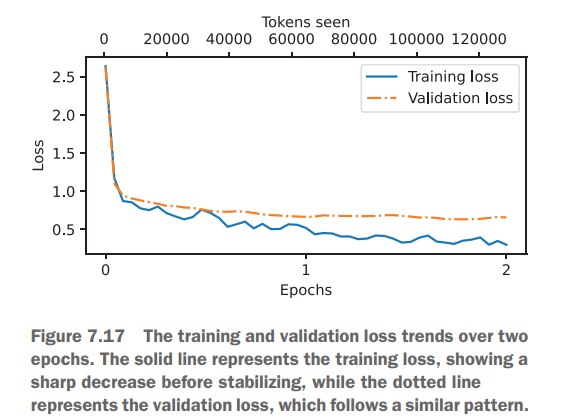
说明训练还是很有效的。
1.7 Evaluating the fine-tuned LLM
我们看一下微调后对于一些prompt的输出:
torch.manual_seed(123)


for entry in test_data[:3]:

    input_text = format_input(entry)

    token_ids = generate(
        model=model,
        idx=text_to_token_ids(input_text, tokenizer).to(device),
        max_new_tokens=256,
        context_size=BASE_CONFIG["context_length"],
        eos_id=50256
    )
    generated_text = token_ids_to_text(token_ids, tokenizer)
    response_text = (
        generated_text[len(input_text):]
        .replace("### Response:", "")
        .strip()
)

    print(input_text)
    print(f"\nCorrect response:\n>> {entry['output']}")
    print(f"\nModel response:\n>> {response_text.strip()}")
    print("-------------------------------------")
Below is an instruction that describes a task. Write a response that appropriately completes the request.

### Instruction:
Rewrite the sentence using a simile.

### Input:
The car is very fast.

Correct response:
>> The car is as fast as lightning.

Model response:
>> The car is as fast as a cheetah.
-------------------------------------
Below is an instruction that describes a task. Write a response that appropriately completes the request.

### Instruction:
What type of cloud is typically associated with thunderstorms?

Correct response:
>> The type of cloud typically associated with thunderstorms is cumulonimbus.

Model response:
>> The type of cloud associated with thunderstorms is a cumulus cloud.
-------------------------------------
Below is an instruction that describes a task. Write a response that appropriately completes the request.

### Instruction:
Name the author of 'Pride and Prejudice'.

Correct response:
>> Jane Austen.

Model response:
>> The author of 'Pride and Prejudice' is Jane Austen.
-------------------------------------
模型的回答还是相对比较好的。
不过第二个问题回答的不太准确:
我们期望回答:“cumulonimbus”,但是回答了:“cumulus cloud”,尽管“cumulus cloud”能够发展成"cumulonimbus"的,也算勉强符合。
不过麻烦的是,instruction fine tuning 的模型的评估不像 classification fine tuning 那样简单直接,实际中有很多方法:
- 短答案和选择题基准测试,如MMLU(“衡量大规模多任务语言理解”),用于测试模型的知识水平。
- 人类偏好比较,如LMSYS聊天机器人竞技场,用于与其他大语言模型(LLM)进行比较。
- 自动化对话基准测试,例如AlpacaEval,其中使用另一个大语言模型(如GPT-4)来评估响应。
下面,我们会使用类似于AlpacaEval的方法,用另一个LLM来评估我们模型的输出。
所以我们会将模型的Response保存到test_data里面,并且另存为"instruction-data-with-response.json" 文件为了持续记录,这样便于我们后续加载和分析。
from tqdm import tqdm

for i, entry in tqdm(enumerate(test_data), total=len(test_data)):
    input_text = format_input(entry)

    token_ids = generate(
        model=model,
        idx=text_to_token_ids(input_text, tokenizer).to(device),
        max_new_tokens=256,
        context_size=BASE_CONFIG["context_length"],
        eos_id=50256
    )
    generated_text = token_ids_to_text(token_ids, tokenizer)

    response_text = (
        generated_text[len(input_text):]
        .replace("### Response:", "")
        .strip()
    )
    test_data[i]["model_response"] = response_text

with open("instruction-data-with-response.json", "w") as file:
    json.dump(test_data, file, indent=4)
100%|██████████| 110/110 [07:47<00:00, 4.25s/it]
我们看一条test_data里面的数据来检查一下模型的Response是否已经添加进去了。
print(test_data[0])
{'instruction': 'Rewrite the sentence using a simile.', 'input': 'The car is very fast.', 'output': 'The car is as fast as lightning.', 'model_response': 'The car is as fast as a cheetah.'}
最后,我们也保存一下这个模型,以免将来我们需要再次使用这个模型。
import re

file_name = f"{re.sub(r'[ ()]', '', CHOOSE_MODEL) }-sft.pth"
torch.save(model.state_dict(), file_name)
print(f"Model saved as {file_name}")
Model saved as gpt2-medium355M-sft.pth
1.8 Evaluating the fine-tuned LLM
先去官网下ollama:ollama
然后开个命令行:
ollama serve
然后再开个命令行:
ollama run llama3
然后就会去下载llama3的模型:
pulling manifest
pulling 6a0746a1ec1a... 100% |████████████████| 4.7 GB
pulling 4fa551d4f938... 100% |████████████████| 12 KB
pulling 8ab4849b038c... 100% |████████████████| 254 B
pulling 577073ffcc6c... 100% |████████████████| 110 B
pulling 3f8eb4da87fa... 100% |████████████████| 485 B
verifying sha256 digest
writing manifest
removing any unused layers
success
下完之后,我们就可以在命令行中交互,比如我们问一下:“What do llamas eat?”
>>> What do llamas eat?
Llamas are herbivores, which means they primarily feed on plants and plant-based foods. Their diet typically consists of:

1. Grasses: Llamas love to graze on grasses, including tallgrass, shortgrass, and pasture grasses.
2. Hay: High-quality hay, such as alfalfa or timothy hay, is a staple in a llama's diet. Hay provides essential fiber and nutrients.
3. Grains: Oats, barley, and corn are sometimes fed to llamas as a source of energy and protein.
4. Fruits and vegetables: Llamas may enjoy fruits like apples, carrots, and sweet potatoes as treats or supplements.
5. Minerals: Llamas need access to mineral-rich substances, such as salt licks or loose minerals, to maintain good health.

A typical llama's diet might include:

* 2-4 pounds of hay per day
* 1-2 pounds of grains or pellets per day
* Fresh water and access to a salt lick or mineral block

It's essential to provide llamas with a balanced diet that meets their nutritional needs. A veterinarian or experienced llama breeder can help you
develop a customized feeding plan for your llama.

Remember, llamas are ruminants, which means they have a four-chambered stomach designed to break down and extract nutrients from plant-based foods. A
diet high in fiber and low in grains is generally recommended for optimal health.

>>> Send a message (/? for help)
下面的代码是用来检查ollama session是否正在正常运行:
import psutil

def check_if_running(process_name):
    running = False
    for proc in psutil.process_iter(["name"]):
        if process_name in proc.info["name"]:
            running = True
            break
    return running

ollama_running = check_if_running("ollama")

if not ollama_running:
    raise RuntimeError("Ollama not running. Launch ollama before proceeding.")
print("Ollama running:", check_if_running("ollama"))
Ollama running: True
在命令行和llama3交互来评测我们的response还是太低效了,我们采用REST API来调用ollama提供的接口:
import urllib.request

def query_model(
    prompt,
    model="llama3",
    url="http://localhost:11434/api/chat"
):
    # Create the data payload as a dictionary
    data = {
        "model": model,
        "messages": [
            {"role": "user", "content": prompt}
        ],
        "options": {     # Settings below are required for deterministic responses
            "seed": 123,
            "temperature": 0,
            "num_ctx": 2048
        }
    }


    # Convert the dictionary to a JSON formatted string and encode it to bytes
    payload = json.dumps(data).encode("utf-8")

    # Create a request object, setting the method to POST and adding necessary headers
    request = urllib.request.Request(
        url,
        data=payload,
        method="POST"
    )
    request.add_header("Content-Type", "application/json")

    # Send the request and capture the response
    response_data = ""
    with urllib.request.urlopen(request) as response:
        # Read and decode the response
        while True:
            line = response.readline().decode("utf-8")
            if not line:
                break
            response_json = json.loads(line)
            response_data += response_json["message"]["content"]

    return response_data


model = "llama3"
result = query_model("What do Llamas eat?", model)
print(result)
Llamas are herbivores, which means they primarily feed on plant-based foods. Their diet typically consists of:

1. Grasses: Llamas love to graze on various types of grasses, including tall grasses, short grasses, and even weeds.
2. Hay: High-quality hay, such as alfalfa or timothy hay, is a staple in a llama's diet. They enjoy the sweet taste and texture of fresh hay.
3. Grains: Llamas may receive grains like oats, barley, or corn as part of their daily ration. However, it's essential to provide these grains in moderation, as they can be high in calories.
4. Fruits and vegetables: Llamas enjoy a variety of fruits and veggies, such as apples, carrots, sweet potatoes, and leafy greens like kale or spinach.
5. Minerals: Llamas require access to mineral supplements, which help maintain their overall health and digestive system.

In the wild, llamas might also eat:

1. Leaves: They'll munch on leaves from trees and shrubs, including plants like willow, alder, and birch.
2. Bark: In some cases, llamas may eat the bark of certain trees, like aspen or cottonwood.
3. Mosses: Llamas might snack on mosses, which are non-vascular plants that grow in dense clusters.

In captivity, llama owners typically provide a balanced diet that includes a mix of hay, grains, and fruits/vegetables. It's essential to consult with a veterinarian or experienced llama breeder to determine the best feeding plan for your llama.
然后我们利用这种方式来评测我们的前三个response:
for entry in test_data[:3]:
    prompt = (
        f"Given the input `{format_input(entry)}` "
        f"and correct output `{entry['output']}`, "
        f"score the model response `{entry['model_response']}`"
        f" on a scale from 0 to 100, where 100 is the best score. "
    )
    print("\nDataset response:")
    print(">>", entry['output'])
    print("\nModel response:")
    print(">>", entry["model_response"])
    print("\nScore:")
    print(">>", query_model(prompt))
    print("\n-------------------------")
Dataset response:
>> The car is as fast as lightning.

Model response:
>> The car is as fast as a cheetah.

Score:
>> I'd score this response an 80.

Here's why:

* The model correctly uses a simile ("as fast as") to compare the speed of the car to that of another entity.
* It chooses a relevant and familiar animal (cheetah) known for its speed, which makes the comparison relatable and easy to understand.
* However, while a cheetah is indeed very fast, it's not quite as iconic or universally recognized as lightning, which is often used as a symbol of incredible speed. Using lightning instead might make the comparison more vivid and memorable.

Overall, the model does a great job with this response, but using lightning instead of a cheetah would take it to the next level!

-------------------------

Dataset response:
>> The type of cloud typically associated with thunderstorms is cumulonimbus.

Model response:
>> The type of cloud associated with thunderstorms is a cumulus cloud.

Score:
>> I'd score this model response as 40 out of 100.

Here's why:

* The model correctly identifies that thunderstorms are associated with clouds (correctly identifying the type of weather phenomenon).
* However, it incorrectly specifies the type of cloud as "cumulus" instead of "cumulonimbus", which is the correct answer.
* Cumulus clouds are generally puffy and white, whereas cumulonimbus clouds are tall, dense, and associated with severe thunderstorms.

To achieve a higher score, the model should have provided the correct answer, "cumulonimbus", or at least been more accurate in its description of the cloud type.

-------------------------

Dataset response:
>> Jane Austen.

Model response:
>> The author of 'Pride and Prejudice' is Jane Austen.

Score:
>> I'd rate my own response as 95 out of 100. Here's why:

* The response accurately answers the question by naming the author of 'Pride and Prejudice' as Jane Austen.
* The response is concise and clear, making it easy to understand.
* There are no grammatical errors or ambiguities that could lead to misinterpretation.

The only reason I wouldn't give myself a perfect score is that the response is slightly redundant - it simply repeats the question and then answers it. A more creative or engaging response might be possible, but in this case, simplicity and accuracy are key.

-------------------------
- 第一个给了80分,因为正确用了明喻,但是cheetah(猎豹)显然没有lightening(闪电)生动且更让人印象深刻
- 第二个给了40分,因为积云(cumulus)和积雨云(cumulonimbus)是不一样的概念,积云更小强度更低,一般不会和雷暴关联起来
- 第三个给了95分,回答的很正确,但是有点冗长
下面我们对全部的数据进行评测:
def generate_model_scores(json_data, json_key, model="llama3"):
    scores = []
    for entry in tqdm(json_data, desc="Scoring entries"):
        prompt = (
            f"Given the input `{format_input(entry)}` "
            f"and correct output `{entry['output']}`, "
            f"score the model response `{entry[json_key]}`"
            f" on a scale from 0 to 100, where 100 is the best score. "
            f"Respond with the integer number only."
        )
        score = query_model(prompt, model)
        try:
            scores.append(int(score))
        except ValueError:
            print(f"Could not convert score: {score}")
            continue

    return scores


scores = generate_model_scores(test_data, "model_response")
print(f"Number of scores: {len(scores)} of {len(test_data)}")
print(f"Average score: {sum(scores)/len(scores):.2f}\n")
Scoring entries: 100%|██████████| 110/110 [00:55<00:00,  1.98it/s]
Number of scores: 110 of 110
Average score: 45.65
因为Ollama在不同操作系统上的表现并非完全一致,所以得分和作者相比有浮动很正常。
作为一个参考,原始的Llama 3 8B基础模型的得分为58.51,Llama 3 8B指令模型的得分为82.65。
1.9 Conclusions
至此本书的终章也结束了,我们了解到了一个大模型的开发周期内的主要步骤:
- 手动实现一个LLM的架构
- 预训练大模型
- 微调
耗时一周多一点完成本书的学习,体感就是对于我这种llm小白非常友好,整体下来比较轻松。
但是llm显然不止于此,还有很多东西都没有涉及到,我做这个也只是作为CS336前的练习,路还很长,希望终有一日能够做出自己的产品。

说些什么吧!