
一、前言:为什么需要 coding harness
LLM System 的进步并不只来自更强的模型,也来自我们使用模型的方式。
在许多应用中,周围的软件系统,例如工具使用、上下文管理和记忆,其重要程度并不亚于模型本身。Claude Code 或 Codex 这样的系统,往往比把同一个模型直接放进普通聊天界面更有能力。
Coding agent 是为 Soft Engineering 设计的。决定体验的并不只有模型选择,还包括周围的系统:代码仓库上下文、工具设计、prompt cache 的稳定性、记忆,以及长会话的连续性。
二、LLM、Reasoning Model and Agent
2.1 概念分层
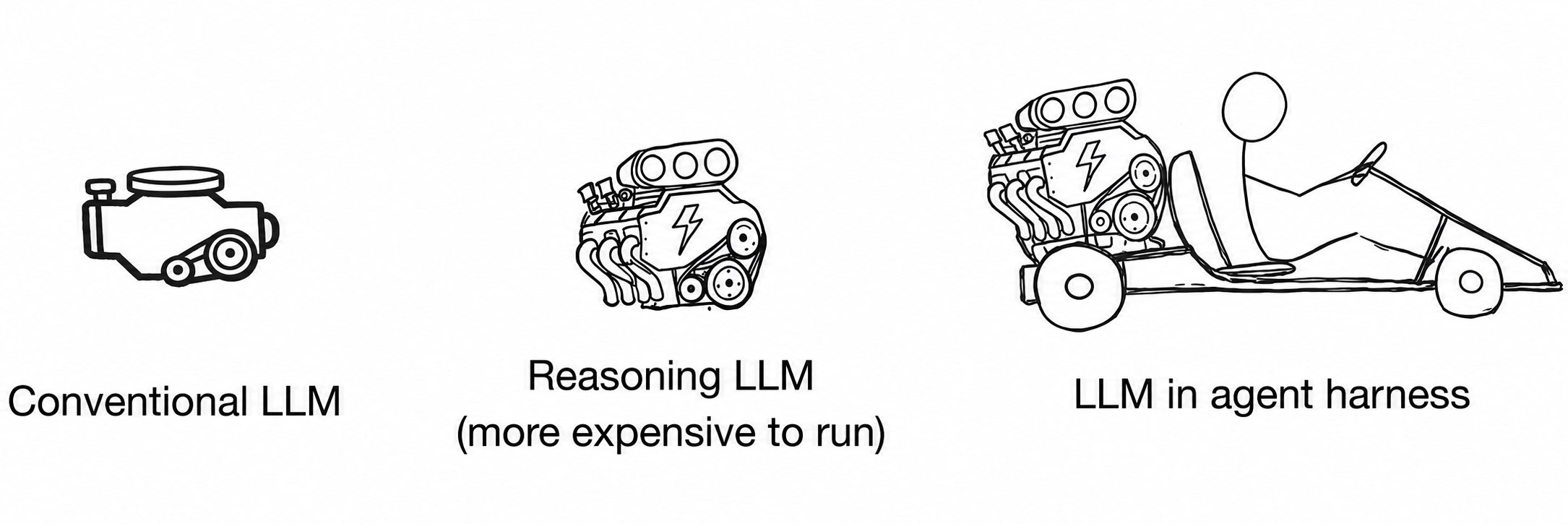
LLM 是基于 next-token 预测的模型。
Reasoning LLM 仍然是 LLM,不过往往要进行训练或提示,在推理时通过更多计算,产生中间推理、答案验证,或者在候选答案之间搜索。
Agent 则是模型上层的控制循环。给定一个目标后,Agent 层或 harness 会决定下一步检查什么、调用哪些工具、如何更新状态,以及什么时候停止。
换句话说,Agent 是一个在环境中反复调用模型的系统。
2.2 省流
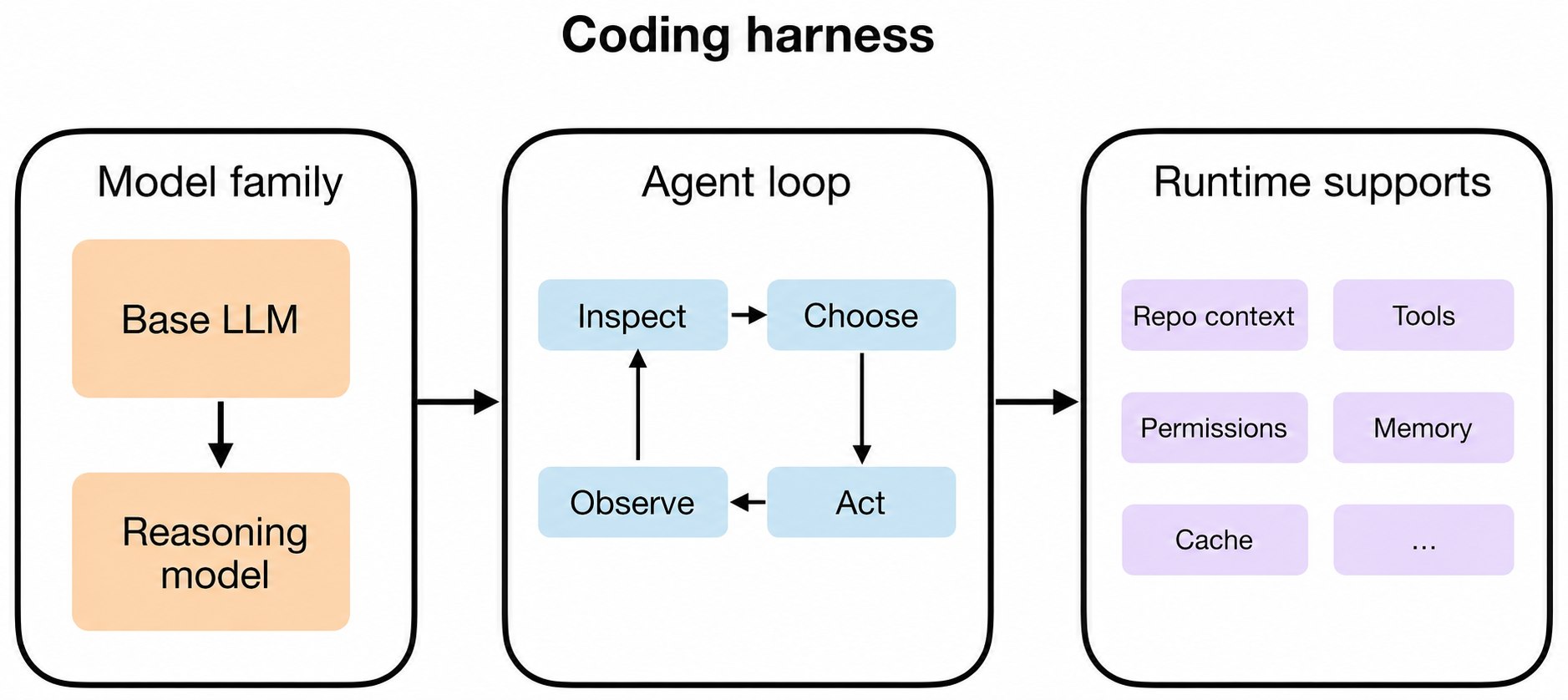
- LLM:原始模型。
- Reasoning LLM:经过优化、能够输出中间推理并进行更多自我验证的 LLM。
- Agent:使用模型、工具、记忆和环境反馈的循环。
- Agent harness:围绕 Agent 的软件骨架,管理上下文、工具使用、prompt、状态和控制流。
- Coding harness:Agent harness 的一个特例,专门管理代码上下文、工具执行和迭代反馈。
Coding harness 是包围模型的软件脚手架,帮助模型有效地编写和编辑代码。Agent harness 的范围更广,并不局限于 coding。Codex 和 Claude Code 都可以被视为 coding harness。
更好的 LLM 能为推理模型提供更好的基础,而 harness 则能从推理模型中榨取更多实际能力。即使普通 LLM 和推理模型在没有 harness 的情况下也能解决 coding 任务,coding 工作也并不只是next-token generation。它还包括仓库导航、搜索、函数定位、应用 diff、运行测试、检查错误,以及把所有相关信息保持在上下文中。
一个好的 coding harness 可以让普通模型和推理模型在实际体验上都显得比纯聊天更强,因为它改善了上下文管理以及其他关键环节。
三、Coding harness
当我们说 harness,通常指围绕模型的软件层:它组装 prompt、暴露工具、跟踪文件状态、应用编辑、 运行命令、管理权限、缓存稳定 prefix、存储记忆等。
如今使用 LLM 时,这一层相较于直接 prompt 模型或使用网页聊天界面,往往更能塑造用户体验。网页 聊天更接近“与上传的文件聊天”,而 coding harness 则会主动操作仓库并获得运行反馈。
当前不同模型的 vanilla 版本可能已经拥有相近的基础能力,因此 harness 常常成为让一个模型比另一个模型更好用的区别因素。即使把一个能力很强的 open-weight LLM 放进类似 harness, 应用层仍然可能决定最终效果。当然,针对 harness 的专门后训练通常也会有帮助。
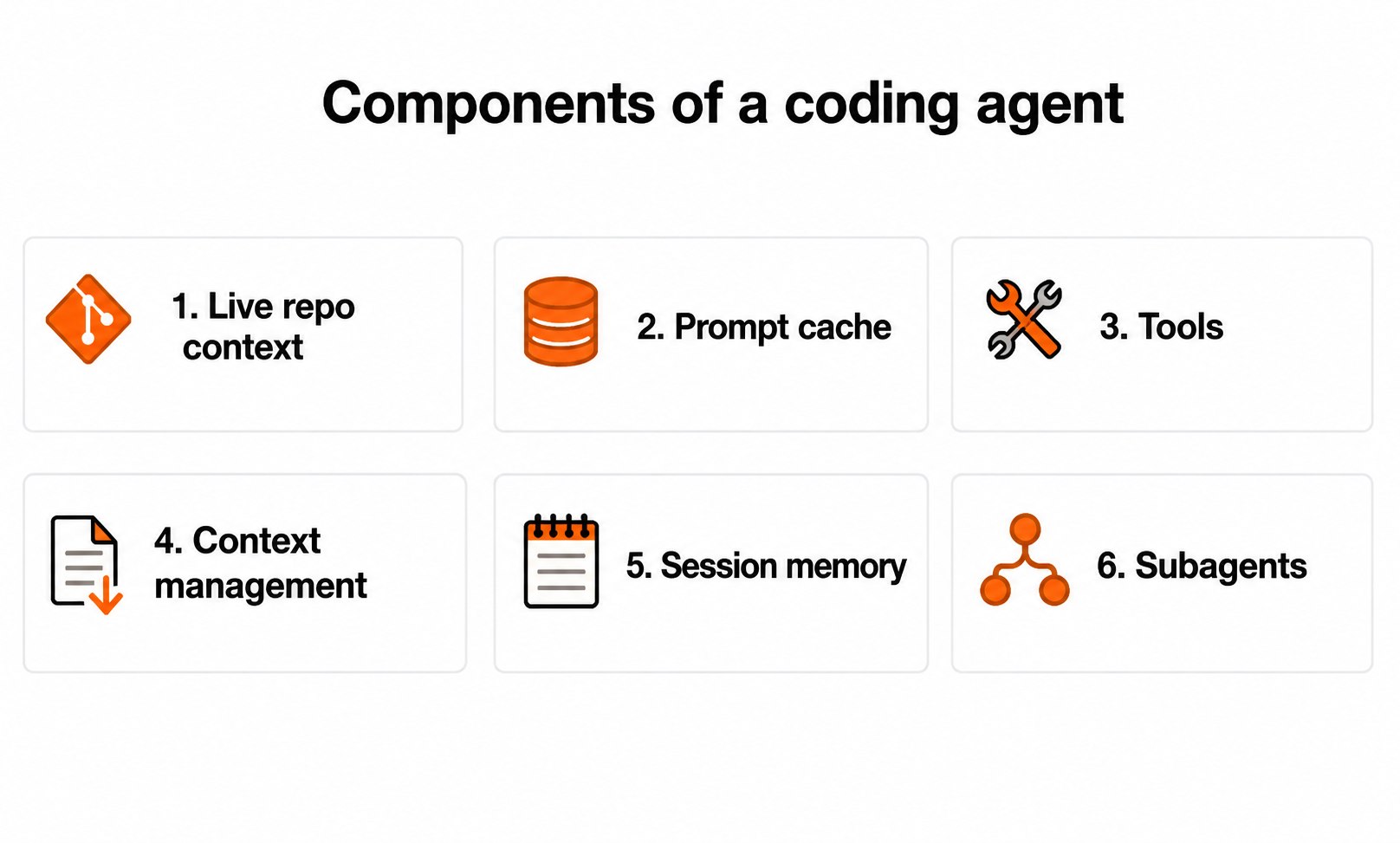
下面我们从零手搓一个 Coding Agent,主要包括 6 个核心组件:
1) Live Repo Context -> WorkspaceContext
2) Prompt Shape And Cache Reuse -> build_prefix, memory_text, prompt
3) Structured Tools, Validation, And Permissions -> build_tools, run_tool, validate_tool, approve, parse, path, tool_*
4) Context Reduction And Output Management -> clip, history_text
5) Transcripts, Memory, And Resumption -> SessionStore, record, note_tool, ask, reset
6) Delegation And Bounded Subagents -> tool_delegate
1. Live Repo Context
当用户说“修复测试”或“实现某个功能”时,模型应该知道自己是否处在 Git 仓库中、当前在哪个分支、项目文档中有哪些说明,以及当前代码布局是什么样。
这些信息会改变正确的行动。例如,“修复测试”并不是一个自洽的指令。如果 Agent 能看到 AGENTS.md 或项目 README,就可能知道应该使用哪个测试命令。如果它知道 repo root 和目录结构 ,就可以去正确的位置寻找代码,而不是猜测。
当前 branch、git status 和最近的 commits 也能帮助 Agent 理解正在进行的工作,以及应该关注哪些变更。
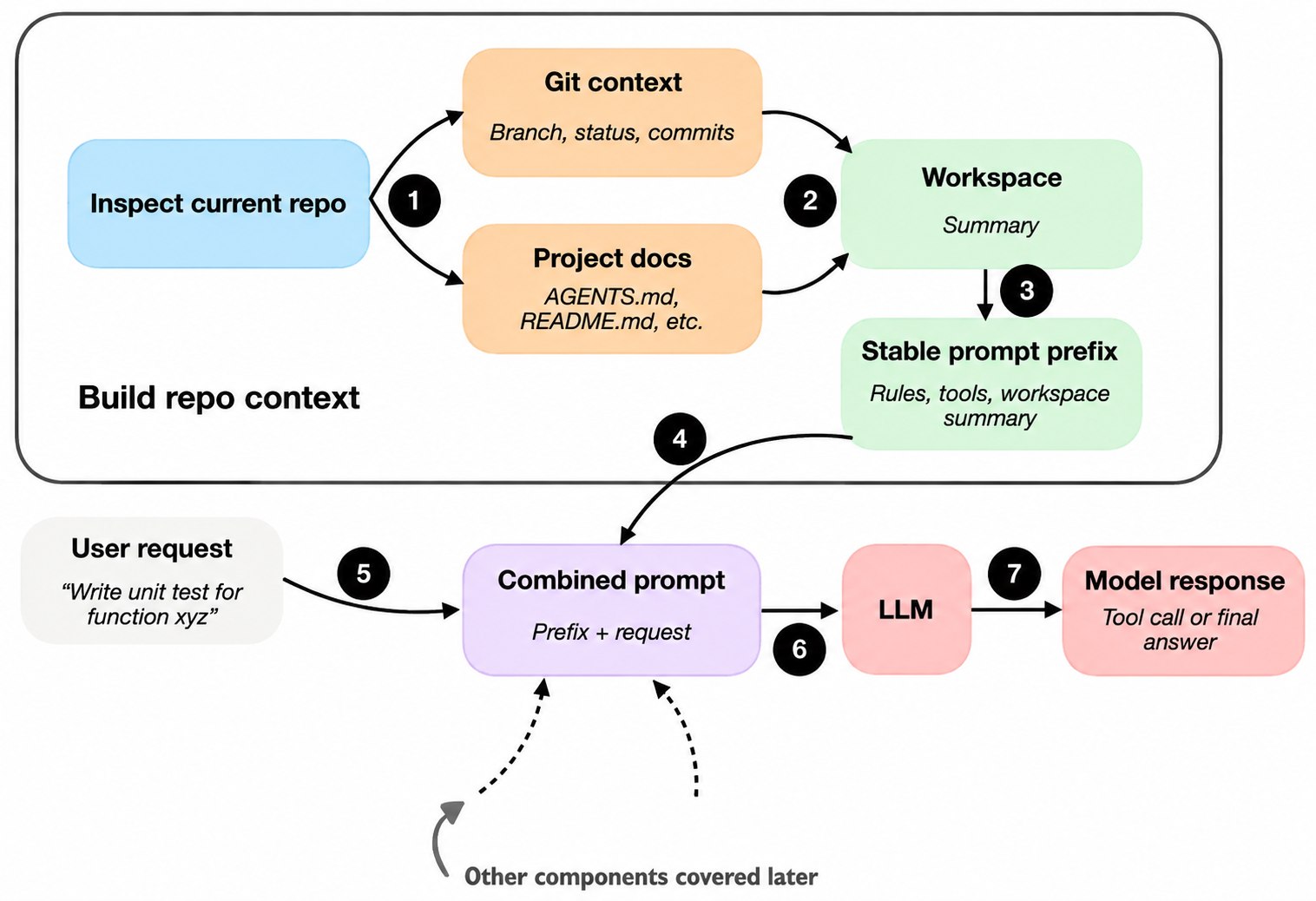
核心思想是:coding agent 在开始工作前先收集稳定事实,形成 workspace summary。这样每次收到新请求时,它不是从零开始,也不会每一轮都重新猜测仓库环境。
我们实现一个 WorkspaceContext 类:
##############################
#### 1) Live Repo Context ####
##############################
class WorkspaceContext:
    def __init__(self, cwd, repo_root, branch, default_branch, status, recent_commits, project_docs):
        self.cwd = cwd
        self.repo_root = repo_root
        self.branch = branch
        self.default_branch = default_branch
        self.status = status
        self.recent_commits = recent_commits
        self.project_docs = project_docs

    @classmethod
    def build(cls, cwd):
        cwd = Path(cwd).resolve()

        def git(args, fallback=""):
            try:
                result = subprocess.run(
                    ["git", *args],
                    cwd=cwd,
                    capture_output=True,
                    text=True,
                    check=True,
                    timeout=5,
                )
                return result.stdout.strip() or fallback
            except Exception:
                return fallback

        repo_root = Path(git(["rev-parse", "--show-toplevel"], str(cwd))).resolve()
        docs = {}
        for base in (repo_root, cwd):
            for name in DOC_NAMES:
                path = base / name
                if not path.exists():
                    continue
                key = str(path.relative_to(repo_root))
                if key in docs:
                    continue
                docs[key] = clip(path.read_text(encoding="utf-8", errors="replace"), 1200)

        return cls(
            cwd=str(cwd),
            repo_root=str(repo_root),
            branch=git(["branch", "--show-current"], "-") or "-",
            default_branch=(git(["symbolic-ref", "--short", "refs/remotes/origin/HEAD"], "origin/main") or "origin/main").removeprefix("origin/"),
            status=clip(git(["status", "--short"], "clean") or "clean", 1500),
            recent_commits=[line for line in git(["log", "--oneline", "-5"]).splitlines() if line],
            project_docs=docs,
        )

    def text(self):
        commits = "\n".join(f"- {line}" for line in self.recent_commits) or "- none"
        docs = "\n".join(f"- {path}\n{snippet}" for path, snippet in self.project_docs.items()) or "- none"
        return "\n".join([
            "Workspace:",
            f"- cwd: {self.cwd}",
            f"- repo_root: {self.repo_root}",
            f"- branch: {self.branch}",
            f"- default_branch: {self.default_branch}",
            "- status:",
            self.status,
            "- recent_commits:",
            commits,
            "- project_docs:",
            docs,
        ])
Q:为什么要同时记录 cwd 和 repo root
A:
用户可能把 Agent 启动在 repo 的子目录中,但 Git 命令需要从仓库根目录理解状态。另一方面,当前任务可能只关心子目录。
因此应该保留两个概念:
- cwd:用户指定的工作目录;
- repo_root:Git 识别出的仓库根目录。
本仓库的文件工具最终以 repo_root 为安全根目录。这一选择适合 coding harness,但如果你想让 Agent 严格限制在 cwd,需要显式改变设计并补充测试。
2. Prompt Shape And Cache Reuse
有了 repo view 之后,下一个问题是:如何把这些信息提供给模型?
简单的做法是把所有信息和用户请求拼成一个巨大 prompt,但在重复的 coding 会话中,这通常很浪费。
Agent 的规则通常不变,工具说明通常不变,workspace summary 也大体不变。真正经常变化的是最新用户请求、最近的 transcript,以及短期 memory。
更聪明的 runtime 不会每次把所有内容当作一个没有结构的巨大 prompt 重新构建,而是把稳定部分和变化部分分开。
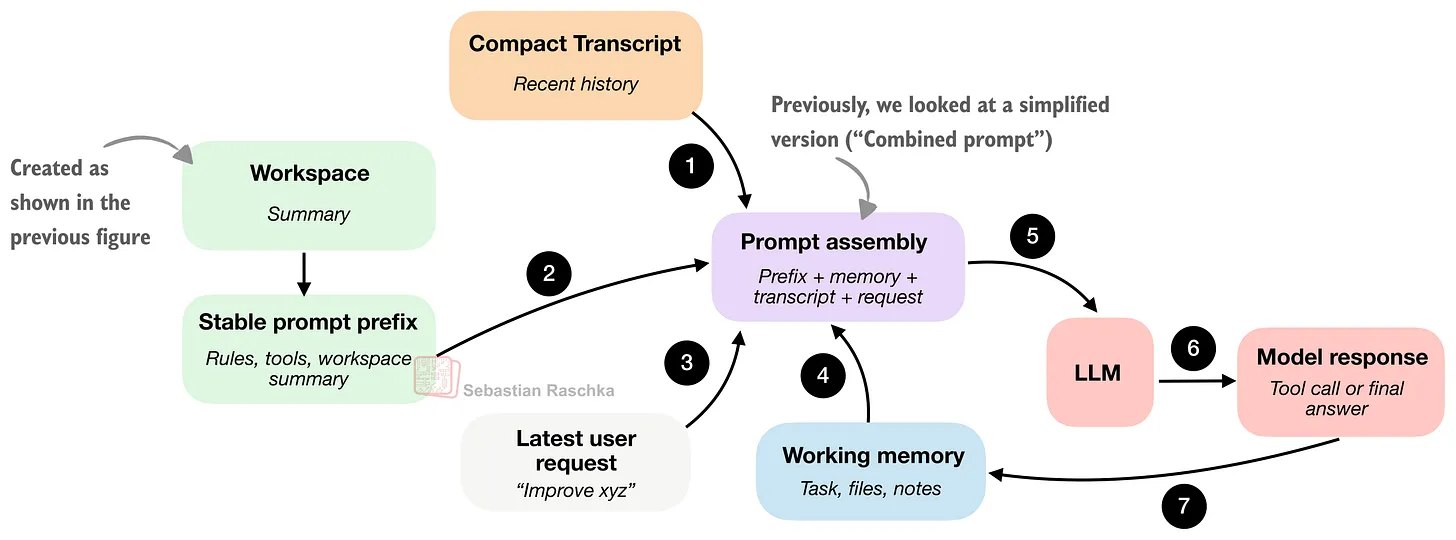
那么我们如何高效包装这些事实,以便重复调用模型?
考虑到 kv cache 的缘故,我们希望有稳定的 prompt prefix 指变化不大的信息,通常包括通用指令、工具描述和 workspace summary。如果重要内容没有改变,就不希望每次交互都从头构建和重新处理它。
其他组件更新更频繁,通常每轮都会变化,包括短期 memory、最近 transcript 和最新用户请求。
所谓缓存复用,简单说就是:聪明的 runtime 会尽量重用稳定 prompt prefix,而不是每次都把它当成全新的输入。
关于这个想起前段时间一个挺好玩的事情。去年一个比较火的 agent memory 框架 mem0,被很多人吐槽 token 消耗极大,然后我自己去测的时候,发现默认的配置把 memory 放到 system prompt 前面,然后前缀 cache 就爆炸了……(不过mem0本身的开销就是很大罢了,没得洗)
如果我们要去写一个 mini agent 类:
class MiniAgent:
    def __init__(
        self,
        model_client,
        workspace,
        session_store,
        session=None,
        approval_policy="ask",
        max_steps=6,
        max_new_tokens=512,
        depth=0,
        max_depth=1,
        read_only=False,
    ):
        self.model_client = model_client
        self.workspace = workspace
        self.root = Path(workspace.repo_root)
        self.session_store = session_store
        self.approval_policy = approval_policy
        self.max_steps = max_steps
        self.max_new_tokens = max_new_tokens
        self.depth = depth
        self.max_depth = max_depth
        self.read_only = read_only
        self.session = session or {
            "id": datetime.now().strftime("%Y%m%d-%H%M%S") + "-" + uuid.uuid4().hex[:6],
            "created_at": now(),
            "workspace_root": workspace.repo_root,
            "history": [],
            "memory": {"task": "", "files": [], "notes": []},
        }
        self.tools = self.build_tools()
        self.prefix = self.build_prefix()
        self.session_path = self.session_store.save(self.session)
build_prefix() 生成相对稳定的信息:
- Agent 的身份和总规则;
- 工具名称、参数 schema、风险等级和描述;
- 有效 tool/final response 示例;
- workspace summary。
    ############################################
    #### 2) Prompt Shape And Cache Reuse #######
    ############################################
    def build_prefix(self):
        tool_lines = []
        for name, tool in self.tools.items():
            fields = ", ".join(f"{key}: {value}" for key, value in tool["schema"].items())
            risk = "approval required" if tool["risky"] else "safe"
            tool_lines.append(f"- {name}({fields}) [{risk}] {tool['description']}")
        tool_text = "\n".join(tool_lines)
        examples = "\n".join(
            [
                '<tool>{"name":"list_files","args":{"path":"."}}</tool>',
                '<tool>{"name":"read_file","args":{"path":"README.md","start":1,"end":80}}</tool>',
                '<tool name="write_file" path="binary_search.py"><content>def binary_search(nums, target):\n    return -1\n</content></tool>',
                '<tool name="patch_file" path="binary_search.py"><old_text>return -1</old_text><new_text>return mid</new_text></tool>',
                '<tool>{"name":"run_shell","args":{"command":"uv run --with pytest python -m pytest -q","timeout":20}}</tool>',
                "<final>Done.</final>",
            ]
        )
        rules = "\n".join([
            "- Use tools instead of guessing about the workspace.",
            "- Return exactly one <tool>...</tool> or one <final>...</final>.",
            "- Tool calls must look like:",
            '  <tool>{"name":"tool_name","args":{...}}</tool>',
            "- For write_file and patch_file with multi-line text, prefer XML style:",
            '  <tool name="write_file" path="file.py"><content>...</content></tool>',
            "- Final answers must look like:",
            "  <final>your answer</final>",
            "- Never invent tool results.",
            "- Keep answers concise and concrete.",
            "- If the user asks you to create or update a specific file and the path is clear, use write_file or patch_file instead of repeatedly listing files.",
            "- Before writing tests for existing code, read the implementation first.",
            "- When writing tests, match the current implementation unless the user explicitly asked you to change the code.",
            "- New files should be complete and runnable, including obvious imports.",
            "- Do not repeat the same tool call with the same arguments if it did not help. Choose a different tool or return a final answer.",
            "- Required tool arguments must not be empty. Do not call read_file, write_file, patch_file, run_shell, or delegate with args={}.",
        ])
        return "\n\n".join([
            "You are Mini-Coding-Agent, a small local coding agent running through Ollama.",
            "Rules:\n" + rules,
            "Tools:\n" + tool_text,
            "Valid response examples:\n" + examples,
            self.workspace.text(),
        ])

    def memory_text(self):
        memory = self.session["memory"]
        notes = "\n".join(f"- {note}" for note in memory["notes"]) or "- none"
        return "\n".join([
            "Memory:",
            f"- task: {memory['task'] or '-'}",
            f"- files: {', '.join(memory['files']) or '-'}",
            "- notes:",
            notes,
        ])
那么用户输入来了之后,我们就会进行拼接:
########################################################
#### 2) Prompt Shape And Cache Reuse (Continued) #######
########################################################
def prompt(self, user_message):
    return "\n\n".join([
        self.prefix,
        self.memory_text(),
        "Transcript:\n" + self.history_text(),
        "Current user request:\n" + user_message,
    ])
3. Tool Access and Use
工具访问和工具使用,是 Agent 开始区别于早期 ChatBot 的地方。
普通模型可以用自然语言建议一条命令, 但 coding harness 中的 LLM 应该能够提出一个更窄、更有用的动作,并真正执行命令、取得结果,而不是让用户手动执行后再把结果粘贴回来。
harness 通常不会让模型随意发明任意语法,而是提供一组预先定义、命名清晰的工具,每个工具都有明确输入和边界。当然,工具内部也可以使用 Python 的 subprocess.call,从而支持较广泛的 shell 命令。
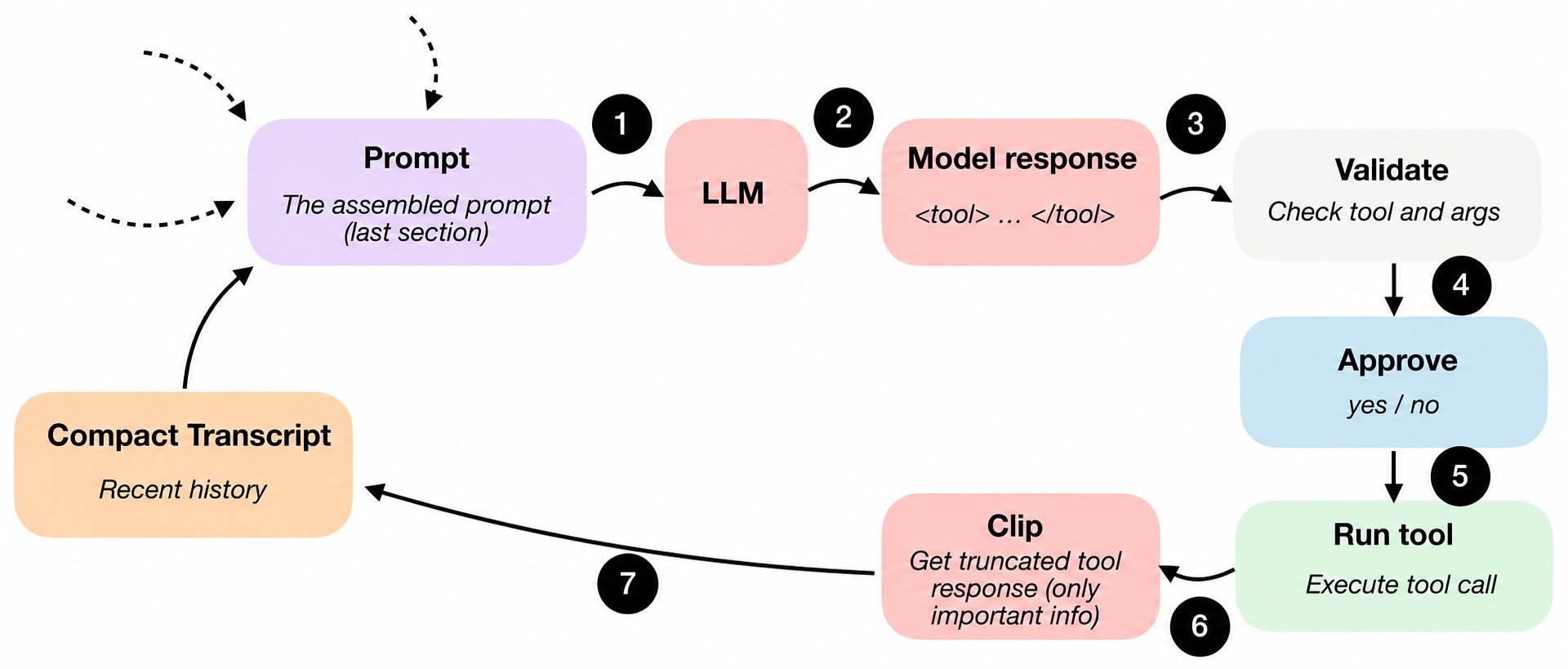
用户看到的典型过程可能是:模型选择 list files、read file、search、run shell、write file 等工具,并 提供 runtime 可以检查的参数。
当模型请求执行某个动作时,runtime 可以编程检查:
- 这是一个已知工具吗?
- 参数是否有效?
- 这个动作是否需要用户批准?
- 请求访问的路径是否确实位于 workspace 内?
只有这些检查通过后,动作才真正执行。coding agent 确实会带来风险,但这些检查也能提升可靠性, 因为模型不会直接执行完全任意的操作。通过拒绝格式错误的动作、设置审批门槛和检查文件路径, harness 可以给模型更少的自由,却同时提供更好的可用性。
一个例子:
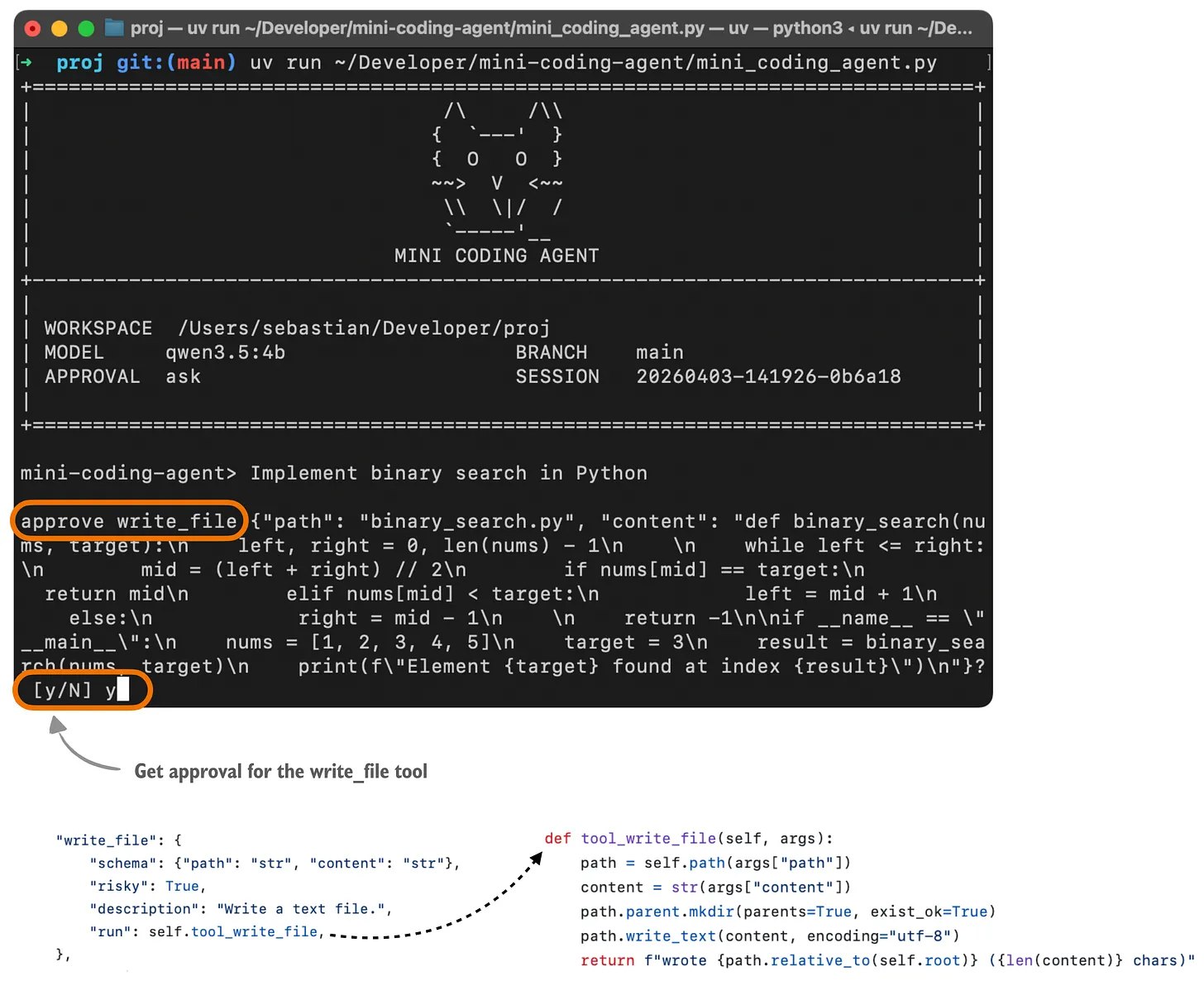
我们人为规定好可用 tools 列表:
    ###############################################
    #### 3) Structured Tools And Permissions ######
    ###############################################
    def build_tools(self):
        tools = {
            "list_files": {
                "schema": {"path": "str='.'"},
                "risky": False,
                "description": "List files in the workspace.",
                "run": self.tool_list_files,
            },
            "read_file": {
                "schema": {"path": "str", "start": "int=1", "end": "int=200"},
                "risky": False,
                "description": "Read a UTF-8 file by line range.",
                "run": self.tool_read_file,
            },
            "search": {
                "schema": {"pattern": "str", "path": "str='.'"},
                "risky": False,
                "description": "Search the workspace with rg or a simple fallback.",
                "run": self.tool_search,
            },
            "run_shell": {
                "schema": {"command": "str", "timeout": "int=20"},
                "risky": True,
                "description": "Run a shell command in the repo root.",
                "run": self.tool_run_shell,
            },
            "write_file": {
                "schema": {"path": "str", "content": "str"},
                "risky": True,
                "description": "Write a text file.",
                "run": self.tool_write_file,
            },
            "patch_file": {
                "schema": {"path": "str", "old_text": "str", "new_text": "str"},
                "risky": True,
                "description": "Replace one exact text block in a file.",
                "run": self.tool_patch_file,
            },
        }
        if self.depth < self.max_depth:
            tools["delegate"] = {
                "schema": {"task": "str", "max_steps": "int=3"},
                "risky": False,
                "description": "Ask a bounded read-only child agent to investigate.",
                "run": self.tool_delegate,
            }
        return tools
然后就是一些 tool 的相关接口:
    #############################################################
    #### 3) Structured Tools, Validation, And Permissions #######
    #############################################################
    def run_tool(self, name, args):
        tool = self.tools.get(name)
        if tool is None:
            return f"error: unknown tool '{name}'"
        try:
            self.validate_tool(name, args)
        except Exception as exc:
            example = self.tool_example(name)
            message = f"error: invalid arguments for {name}: {exc}"
            if example:
                message += f"\nexample: {example}"
            return message
        if self.repeated_tool_call(name, args):
            return f"error: repeated identical tool call for {name}; choose a different tool or return a final answer"
        if tool["risky"] and not self.approve(name, args):
            return f"error: approval denied for {name}"
        try:
            return clip(tool["run"](args))
        except Exception as exc:
            return f"error: tool {name} failed: {exc}"

    def repeated_tool_call(self, name, args):
        tool_events = [item for item in self.session["history"] if item["role"] == "tool"]
        if len(tool_events) < 2:
            return False
        recent = tool_events[-2:]
        return all(item["name"] == name and item["args"] == args for item in recent)

    def tool_example(self, name):
        examples = {
            "list_files": '<tool>{"name":"list_files","args":{"path":"."}}</tool>',
            "read_file": '<tool>{"name":"read_file","args":{"path":"README.md","start":1,"end":80}}</tool>',
            "search": '<tool>{"name":"search","args":{"pattern":"binary_search","path":"."}}</tool>',
            "run_shell": '<tool>{"name":"run_shell","args":{"command":"uv run --with pytest python -m pytest -q","timeout":20}}</tool>',
            "write_file": '<tool name="write_file" path="binary_search.py"><content>def binary_search(nums, target):\n    return -1\n</content></tool>',
            "patch_file": '<tool name="patch_file" path="binary_search.py"><old_text>return -1</old_text><new_text>return mid</new_text></tool>',
            "delegate": '<tool>{"name":"delegate","args":{"task":"inspect README.md","max_steps":3}}</tool>',
        }
        return examples.get(name, "")

    def validate_tool(self, name, args):
        args = args or {}

        if name == "list_files":
            path = self.path(args.get("path", "."))
            if not path.is_dir():
                raise ValueError("path is not a directory")
            return

        if name == "read_file":
            path = self.path(args["path"])
            if not path.is_file():
                raise ValueError("path is not a file")
            start = int(args.get("start", 1))
            end = int(args.get("end", 200))
            if start < 1 or end < start:
                raise ValueError("invalid line range")
            return

        if name == "search":
            pattern = str(args.get("pattern", "")).strip()
            if not pattern:
                raise ValueError("pattern must not be empty")
            self.path(args.get("path", "."))
            return

        if name == "run_shell":
            command = str(args.get("command", "")).strip()
            if not command:
                raise ValueError("command must not be empty")
            timeout = int(args.get("timeout", 20))
            if timeout < 1 or timeout > 120:
                raise ValueError("timeout must be in [1, 120]")
            return

        if name == "write_file":
            path = self.path(args["path"])
            if path.exists() and path.is_dir():
                raise ValueError("path is a directory")
            if "content" not in args:
                raise ValueError("missing content")
            return

        if name == "patch_file":
            path = self.path(args["path"])
            if not path.is_file():
                raise ValueError("path is not a file")
            old_text = str(args.get("old_text", ""))
            if not old_text:
                raise ValueError("old_text must not be empty")
            if "new_text" not in args:
                raise ValueError("missing new_text")
            text = path.read_text(encoding="utf-8")
            count = text.count(old_text)
            if count != 1:
                raise ValueError(f"old_text must occur exactly once, found {count}")
            return

        if name == "delegate":
            if self.depth >= self.max_depth:
                raise ValueError("delegate depth exceeded")
            task = str(args.get("task", "")).strip()
            if not task:
                raise ValueError("task must not be empty")
            return

    def approve(self, name, args):
        if self.read_only:
            return False
        if self.approval_policy == "auto":
            return True
        if self.approval_policy == "never":
            return False
        try:
            answer = input(f"approve {name} {json.dumps(args, ensure_ascii=True)}? [y/N] ")
        except EOFError:
            return False
        return answer.strip().lower() in {"y", "yes"}

    @staticmethod
    def parse(raw):
        raw = str(raw)
        if "<tool>" in raw and ("<final>" not in raw or raw.find("<tool>") < raw.find("<final>")):
            body = MiniAgent.extract(raw, "tool")
            try:
                payload = json.loads(body)
            except Exception:
                return "retry", MiniAgent.retry_notice("model returned malformed tool JSON")
            if not isinstance(payload, dict):
                return "retry", MiniAgent.retry_notice("tool payload must be a JSON object")
            if not str(payload.get("name", "")).strip():
                return "retry", MiniAgent.retry_notice("tool payload is missing a tool name")
            args = payload.get("args", {})
            if args is None:
                payload["args"] = {}
            elif not isinstance(args, dict):
                return "retry", MiniAgent.retry_notice()
            return "tool", payload
        if "<tool" in raw and ("<final>" not in raw or raw.find("<tool") < raw.find("<final>")):
            payload = MiniAgent.parse_xml_tool(raw)
            if payload is not None:
                return "tool", payload
            return "retry", MiniAgent.retry_notice()
        if "<final>" in raw:
            final = MiniAgent.extract(raw, "final").strip()
            if final:
                return "final", final
            return "retry", MiniAgent.retry_notice("model returned an empty <final> answer")
        raw = raw.strip()
        if raw:
            return "final", raw
        return "retry", MiniAgent.retry_notice("model returned an empty response")

    @staticmethod
    def retry_notice(problem=None):
        prefix = "Runtime notice"
        if problem:
            prefix += f": {problem}"
        else:
            prefix += ": model returned malformed tool output"
        return (
            f"{prefix}. Reply with a valid <tool> call or a non-empty <final> answer. "
            'For multi-line files, prefer <tool name="write_file" path="file.py"><content>...</content></tool>.'
        )

    @staticmethod
    def parse_xml_tool(raw):
        match = re.search(r"<tool(?P<attrs>[^>]*)>(?P<body>.*?)</tool>", raw, re.S)
        if not match:
            return None
        attrs = MiniAgent.parse_attrs(match.group("attrs"))
        name = str(attrs.pop("name", "")).strip()
        if not name:
            return None

        body = match.group("body")
        args = dict(attrs)
        for key in ("content", "old_text", "new_text", "command", "task", "pattern", "path"):
            if f"<{key}>" in body:
                args[key] = MiniAgent.extract_raw(body, key)

        body_text = body.strip("\n")
        if name == "write_file" and "content" not in args and body_text:
            args["content"] = body_text
        if name == "delegate" and "task" not in args and body_text:
            args["task"] = body_text.strip()
        return {"name": name, "args": args}

    @staticmethod
    def parse_attrs(text):
        attrs = {}
        for match in re.finditer(r"""([A-Za-z_][A-Za-z0-9_]*)\s*=\s*(?:"([^"]*)"|'([^']*)')""", text):
            attrs[match.group(1)] = match.group(2) if match.group(2) is not None else match.group(3)
        return attrs

    @staticmethod
    def extract(text, tag):
        start_tag = f"<{tag}>"
        end_tag = f"</{tag}>"
        start = text.find(start_tag)
        if start == -1:
            return text
        start += len(start_tag)
        end = text.find(end_tag, start)
        if end == -1:
            return text[start:].strip()
        return text[start:end].strip()

    @staticmethod
    def extract_raw(text, tag):
        start_tag = f"<{tag}>"
        end_tag = f"</{tag}>"
        start = text.find(start_tag)
        if start == -1:
            return text
        start += len(start_tag)
        end = text.find(end_tag, start)
        if end == -1:
            return text[start:]
        return text[start:end]

    def reset(self):
        self.session["history"] = []
        self.session["memory"] = {"task": "", "files": [], "notes": []}
        self.session_store.save(self.session)

    def path_is_within_root(self, resolved):
        probe = resolved
        while not probe.exists() and probe.parent != probe:
            probe = probe.parent
        for candidate in (probe, *probe.parents):
            try:
                if candidate.samefile(self.root):
                    return True
            except OSError:
                continue
        return False

    def path(self, raw_path):
        path = Path(raw_path)
        path = path if path.is_absolute() else self.root / path
        resolved = path.resolve()
        if not self.path_is_within_root(resolved):
            raise ValueError(f"path escapes workspace: {raw_path}")
        return resolved

    def tool_list_files(self, args):
        path = self.path(args.get("path", "."))
        if not path.is_dir():
            raise ValueError("path is not a directory")
        entries = [
            item for item in sorted(path.iterdir(), key=lambda item: (item.is_file(), item.name.lower()))
            if item.name not in IGNORED_PATH_NAMES
        ]
        lines = []
        for entry in entries[:200]:
            kind = "[D]" if entry.is_dir() else "[F]"
            lines.append(f"{kind} {entry.relative_to(self.root)}")
        return "\n".join(lines) or "(empty)"

    def tool_read_file(self, args):
        path = self.path(args["path"])
        if not path.is_file():
            raise ValueError("path is not a file")
        start = int(args.get("start", 1))
        end = int(args.get("end", 200))
        if start < 1 or end < start:
            raise ValueError("invalid line range")
        lines = path.read_text(encoding="utf-8", errors="replace").splitlines()
        body = "\n".join(f"{number:>4}: {line}" for number, line in enumerate(lines[start - 1:end], start=start))
        return f"# {path.relative_to(self.root)}\n{body}"

    def tool_search(self, args):
        pattern = str(args.get("pattern", "")).strip()
        if not pattern:
            raise ValueError("pattern must not be empty")
        path = self.path(args.get("path", "."))

        if shutil.which("rg"):
            result = subprocess.run(
                ["rg", "-n", "--smart-case", "--max-count", "200", pattern, str(path)],
                cwd=self.root,
                capture_output=True,
                text=True,
            )
            return result.stdout.strip() or result.stderr.strip() or "(no matches)"

        matches = []
        files = [path] if path.is_file() else [
            item for item in path.rglob("*")
            if item.is_file() and not any(part in IGNORED_PATH_NAMES for part in item.relative_to(self.root).parts)
        ]
        for file_path in files:
            for number, line in enumerate(file_path.read_text(encoding="utf-8", errors="replace").splitlines(), start=1):
                if pattern.lower() in line.lower():
                    matches.append(f"{file_path.relative_to(self.root)}:{number}:{line}")
                    if len(matches) >= 200:
                        return "\n".join(matches)
        return "\n".join(matches) or "(no matches)"

    def tool_run_shell(self, args):
        command = str(args.get("command", "")).strip()
        if not command:
            raise ValueError("command must not be empty")
        timeout = int(args.get("timeout", 20))
        if timeout < 1 or timeout > 120:
            raise ValueError("timeout must be in [1, 120]")
        result = subprocess.run(
            command,
            cwd=self.root,
            shell=True,
            capture_output=True,
            text=True,
            timeout=timeout,
        )
        return "\n".join(
            [
                f"exit_code: {result.returncode}",
                "stdout:",
                result.stdout.strip() or "(empty)",
                "stderr:",
                result.stderr.strip() or "(empty)",
            ]
        )

    def tool_write_file(self, args):
        path = self.path(args["path"])
        content = str(args["content"])
        path.parent.mkdir(parents=True, exist_ok=True)
        path.write_text(content, encoding="utf-8")
        return f"wrote {path.relative_to(self.root)} ({len(content)} chars)"

    def tool_patch_file(self, args):
        path = self.path(args["path"])
        if not path.is_file():
            raise ValueError("path is not a file")
        old_text = str(args.get("old_text", ""))
        if not old_text:
            raise ValueError("old_text must not be empty")
        if "new_text" not in args:
            raise ValueError("missing new_text")
        text = path.read_text(encoding="utf-8")
        count = text.count(old_text)
        if count != 1:
            raise ValueError(f"old_text must occur exactly once, found {count}")
        path.write_text(text.replace(old_text, str(args["new_text"]), 1), encoding="utf-8")
        return f"patched {path.relative_to(self.root)}"
4. Minimizing Context Bloat
上下文膨胀并不是 coding agent 独有的问题,而是 LLM 的普遍问题。虽然现在的 LLM 支持越来越长的上下文,但长上下文仍然昂贵,也可能引入噪声。
多轮 coding 会话尤其容易膨胀,因为其中会反复读取文件、积累很长的工具输出和日志。如果 runtime 每次都保留这些内容的完整细节,很快就会用尽可用上下文 token。
因此,一个好的 coding harness 通常会比普通聊天界面更认真地处理上下文膨胀,而不只是简单截断或总结。
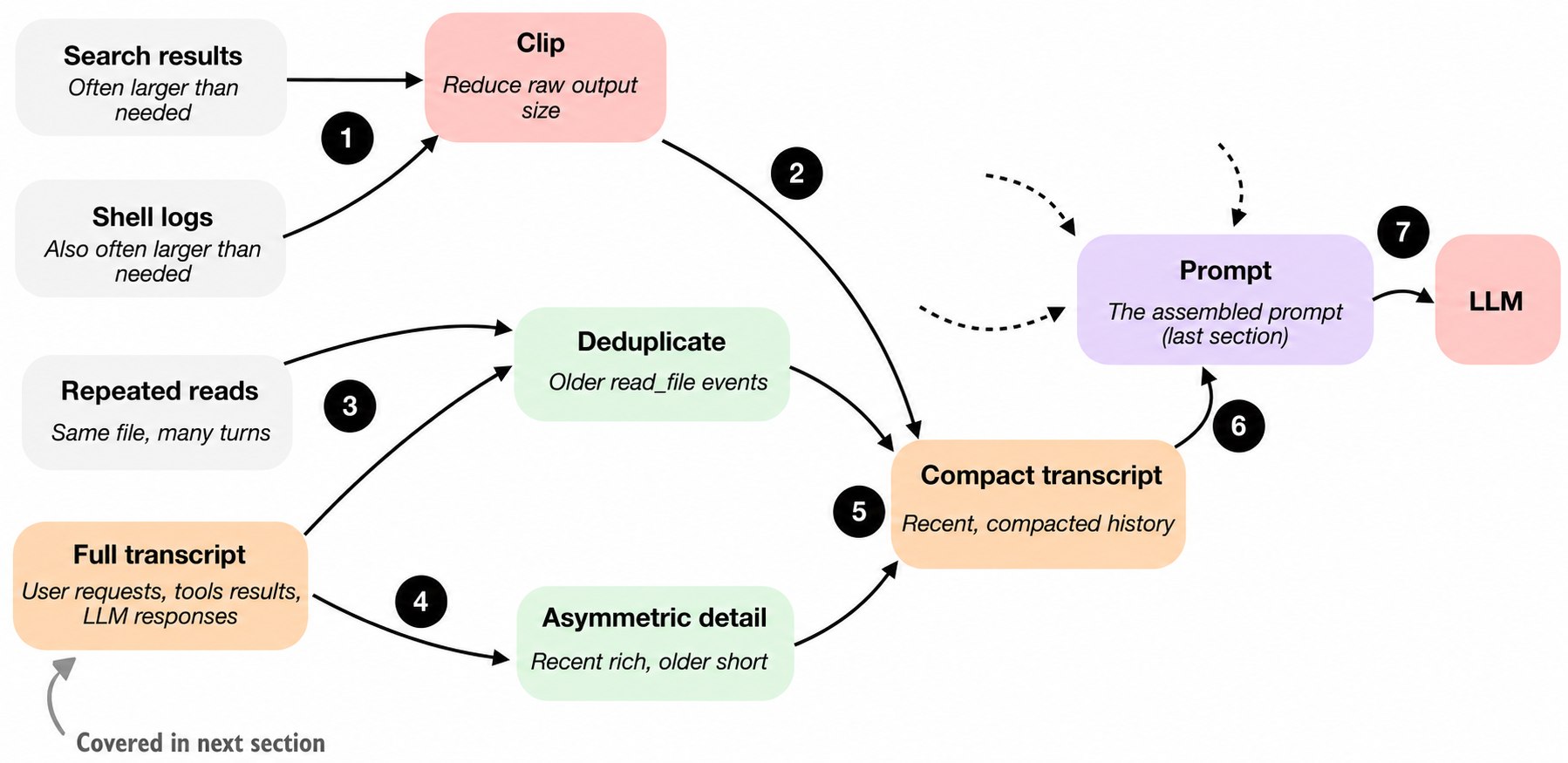
一个最小 harness 至少需要两种压缩策略。
4.1 截断
第一种是 clipping,即缩短较长的文档片段、大型工具输出、memory note 和 transcript 条目。它可以防止某一段内容因为过于冗长而独占 prompt 预算。
示例:
# Supporting helper for component 4 (context reduction and output management).
def clip(text, limit=MAX_TOOL_OUTPUT):
    text = str(text)
    if len(text) <= limit:
        return text
    return text[:limit] + f"\n...[truncated {len(text) - limit} chars]"
4.2 Transcript reduction
第二种是 transcript reduction 或 summarization,即把完整 session history 转换成更小的、可以放进 prompt 的摘要。
一个关键技巧是保留最近事件的更多细节,因为它们更可能与当前步骤相关;较早事件则进行更激进的压缩,因为它们通常不那么重要。另外,还应该对旧的文件读取结果去重,避免模型仅仅因为同一文件被多次读取,就在上下文中反复看到完全相同的内容。
这可能是 coding-agent 设计中最容易被低估、最无聊,却非常重要的部分。很多看起来像 “模型质量” 的东西,实际上是上下文质量。
#####################################################
#### 4) Context Reduction And Output Management #####
#####################################################
def history_text(self):
    history = self.session["history"]
    if not history:
        return "- empty"

    lines = []
    seen_reads = set()
    recent_start = max(0, len(history) - 6)
    for index, item in enumerate(history):
        recent = index >= recent_start
        if item["role"] == "tool" and item["name"] in ("write_file", "patch_file"):
            path = str(item["args"].get("path", ""))
            seen_reads.discard(path)
        if item["role"] == "tool" and item["name"] == "read_file" and not recent:
            path = str(item["args"].get("path", ""))
            if path in seen_reads:
                continue
            seen_reads.add(path)

        if item["role"] == "tool":
            limit = 900 if recent else 180
            lines.append(f"[tool:{item['name']}] {json.dumps(item['args'], sort_keys=True)}")
            lines.append(clip(item["content"], limit))
        else:
            limit = 900 if recent else 220
            lines.append(f"[{item['role']}] {clip(item['content'], limit)}")

    return clip("\n".join(lines), MAX_HISTORY)
5. Structured Session Memory
前面的上下文压缩与本节的 session memory 紧密相关,但二者关注的问题不同。
上下文压缩关注:下一轮 prompt 应该把多少过去内容送回模型?重点是压缩、截断、去重和新近性。
结构化 session memory 关注的是存储时的历史结构:Agent 长期保留什么作为永久记录?重点是 runtime 保存一份更完整的 transcript,同时维护一个更小、会被修改和压缩的 memory 层。
coding agent 至少可以把状态分成两层:
- working memory:Agent 显式维护的小型、提炼后的状态。
- full transcript:包含所有用户请求、工具输出和 LLM 响应。
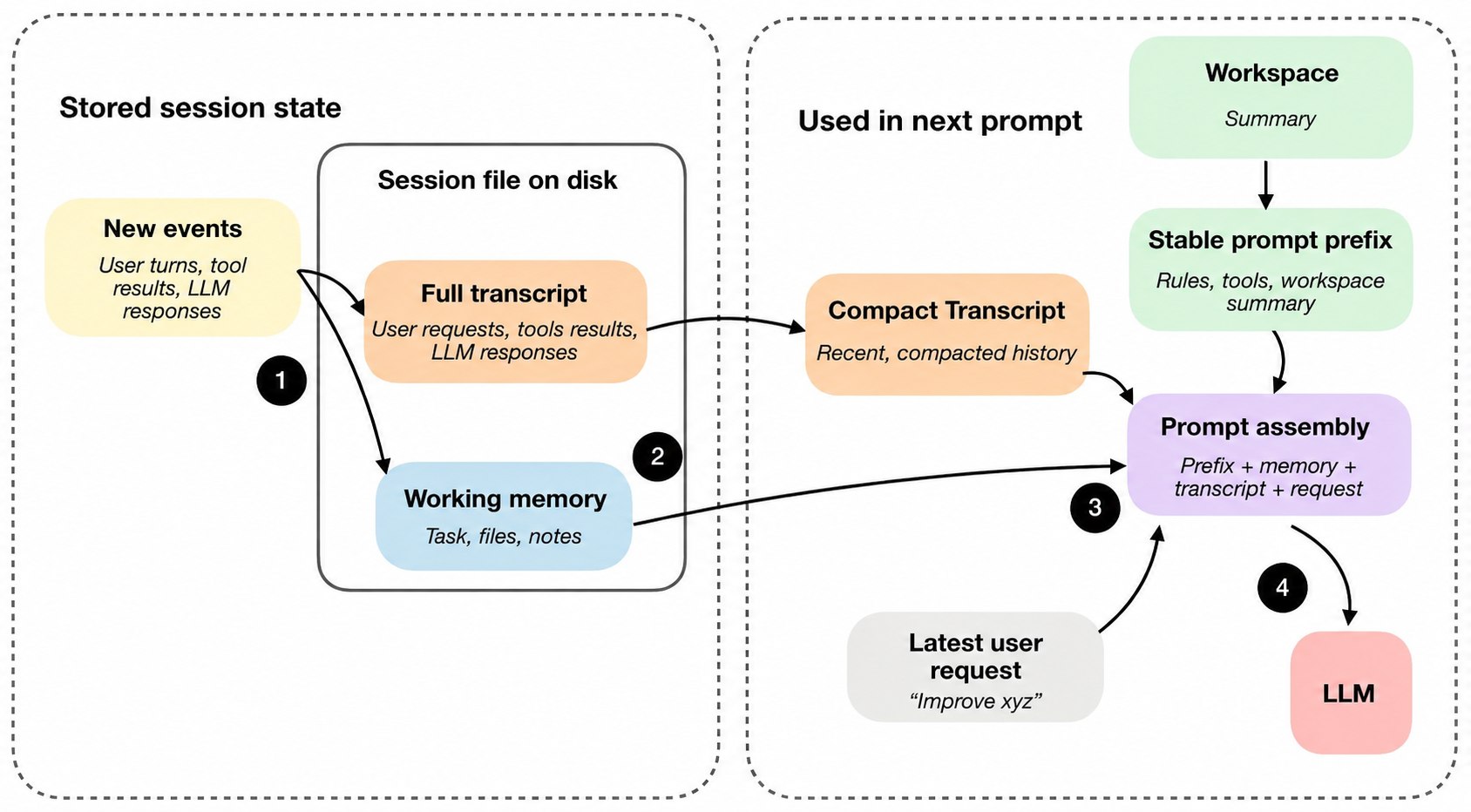
完整 transcript 保存整个历史,Agent 关闭后仍可以恢复。working memory 则是当前最重要信息的提炼版本,与 compact transcript 有关,但用途不同。
compact transcript 用于重建 prompt:它向模型提供压缩后的近期历史,使模型不必每一轮都看到完整 transcript。
working memory 更强调任务连续性:它维护跨轮次仍然重要的小型摘要,例如当前任务、重要文件和最近的 notes。
最新的用户请求、LLM 响应和工具输出会被记录为一个新事件,同时写入完整 transcript 和 working memory。这样,Agent 可以在完整事实记录和轻量工作摘要之间取得平衡。
##############################
#### 5) Session Memory #######
##############################
class SessionStore:
    def __init__(self, root):
        self.root = Path(root)
        self.root.mkdir(parents=True, exist_ok=True)

    def path(self, session_id):
        return self.root / f"{session_id}.json"

    def save(self, session):
        path = self.path(session["id"])
        path.write_text(json.dumps(session, indent=2), encoding="utf-8")
        return path

    def load(self, session_id):
        return json.loads(self.path(session_id).read_text(encoding="utf-8"))

    def latest(self):
        files = sorted(self.root.glob("*.json"), key=lambda path: path.stat().st_mtime)
        return files[-1].stem if files else None
    ###############################################
    #### 5) Session Memory (Continued) ###########
    ###############################################
    def record(self, item):
        self.session["history"].append(item)
        self.session_path = self.session_store.save(self.session)
6. Delegation With (Bounded) Subagents
当 Agent 已经拥有工具和状态后,delegation 是一个自然的下一步能力。它允许主任务把某些工作拆成子任务,从而并行化或加速工作。
例如,主 Agent 可能正在实现一个功能,但需要一个侧面答案:某个 symbol 定义在哪个文件中?配置文件有什么限制?某个测试为什么失败?与其让一个循环同时携带所有问题,不如把这个独立问题交给一个有边界的子任务。
在 接下来的实现中,子 Agent 的实现比较简单,而且 child 是同步运行的,但基本思想相同。
子 Agent 只有在继承了足够上下文时才有用。但如果完全不限制它,就可能出现多个 Agent 重复劳动、修改相同文件、继续创建更多子 Agent 等问题。因此,难点不只是如何创建子 Agent,也包括如何约束它。
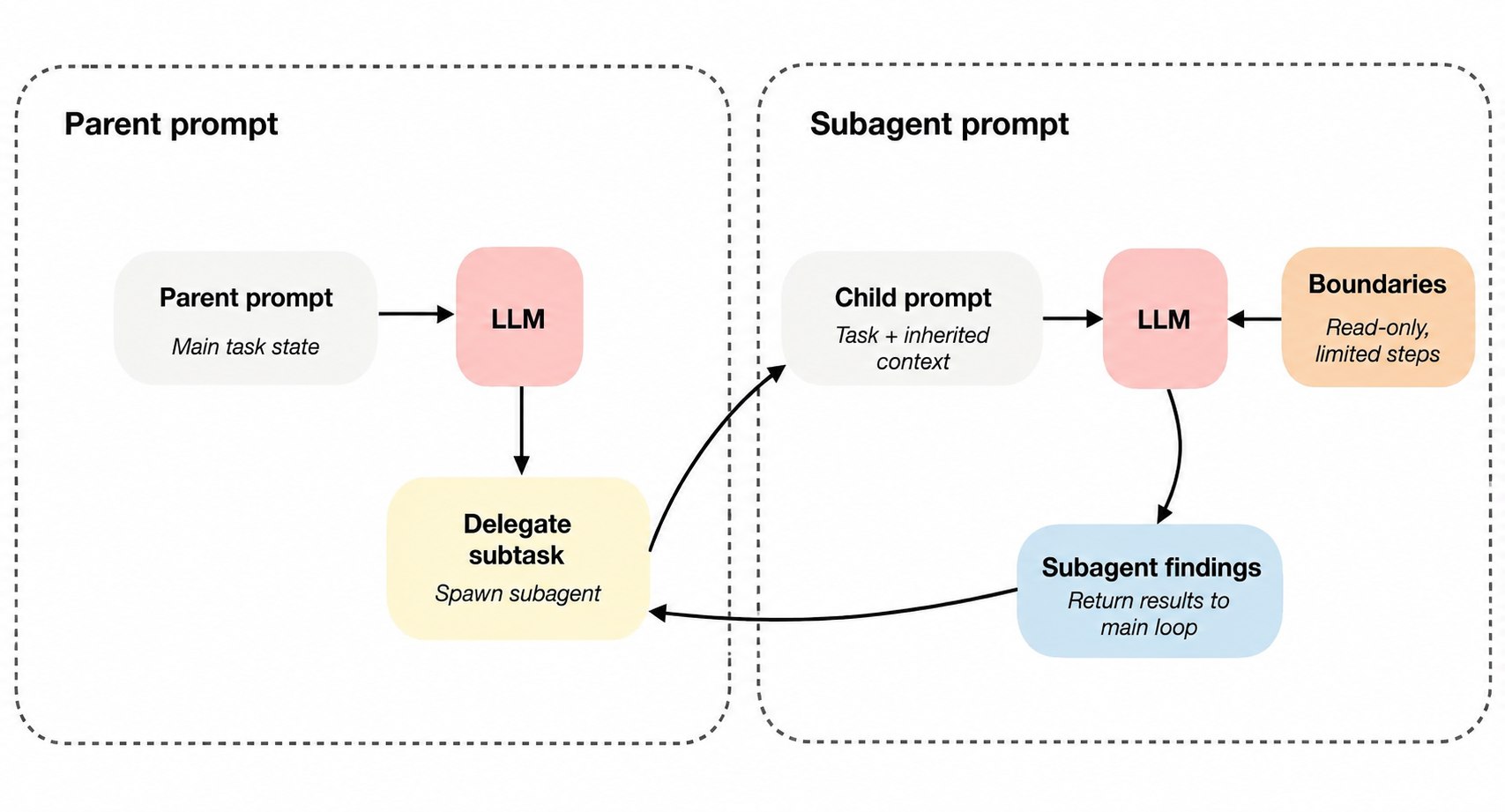
受限的关键在于:子 Agent 继承足够的上下文,同时受到限制,例如只读、递归深度有限或任务范围明确。
不同 coding agent 对子 Agent 的边界有不同选择。有的系统让子 Agent 继承主 Agent 的 sandbox 和审批设置,而不是强制只读。因此,边界也可以来自任务范围、上下文和递归深度。
    ###################################################
    #### 6) Delegation And Bounded Subagents ##########
    ###################################################
    def tool_delegate(self, args):
        if self.depth >= self.max_depth:
            raise ValueError("delegate depth exceeded")
        task = str(args.get("task", "")).strip()
        if not task:
            raise ValueError("task must not be empty")
        child = MiniAgent(
            model_client=self.model_client,
            workspace=self.workspace,
            session_store=self.session_store,
            approval_policy="never",
            max_steps=int(args.get("max_steps", 3)),
            max_new_tokens=self.max_new_tokens,
            depth=self.depth + 1,
            max_depth=self.max_depth,
            read_only=True,
        )
        child.session["memory"]["task"] = task
        child.session["memory"]["notes"] = [clip(self.history_text(), 300)]
        return "delegate_result:\n" + child.ask(task)
Component Summary
前面的六个组件在实现中彼此深度交织。把它们分开讨论,是为了帮助我们理解 coding harness 为什么比简单的多轮聊天更有用。
一个完整的 coding harness 至少需要同时处理:仓库上下文、稳定 prompt、工具协议和执行、安全校验、上下文预算、持久化状态,以及必要时的受限委派。
如果需要一个完整的 mini coding agent 的 python 实现:mini-coding-agent
与 OpenClaw 的比较
OpenClaw 是一个有趣的比较对象,但它并不完全是同一种系统。OpenClaw 更像一个可以 coding 的 本地通用 Agent 平台,而不是专门面向 terminal coding 的助手。
它与 coding harness 仍然有若干重叠之处:
- 使用 workspace 中的 prompt 和 instruction 文件,例如 AGENTS.md、SOUL.md 和 TOOLS.md。
- 保存 JSONL session 文件,并包含 transcript compaction 和 session management。
- 可以启动 helper session 和 subagent。
- 以及其他相似机制。
不过,二者的重点不同。
- Coding agent 针对的是一个人在仓库中工作,并要求 coding assistant 高效检查文件、编辑代码和运行本地工具。
- OpenClaw 更偏向于在多个聊天、频道和 workspace 中运行许多长期存在的本地 Agent,coding 只是其中一种重要工作负载。

说些什么吧!