
零、写在前面
感觉脑子坏掉了,Matmul那里想了好久
一、Benchmarking 与 Profilling
1.1 GPU硬件回顾
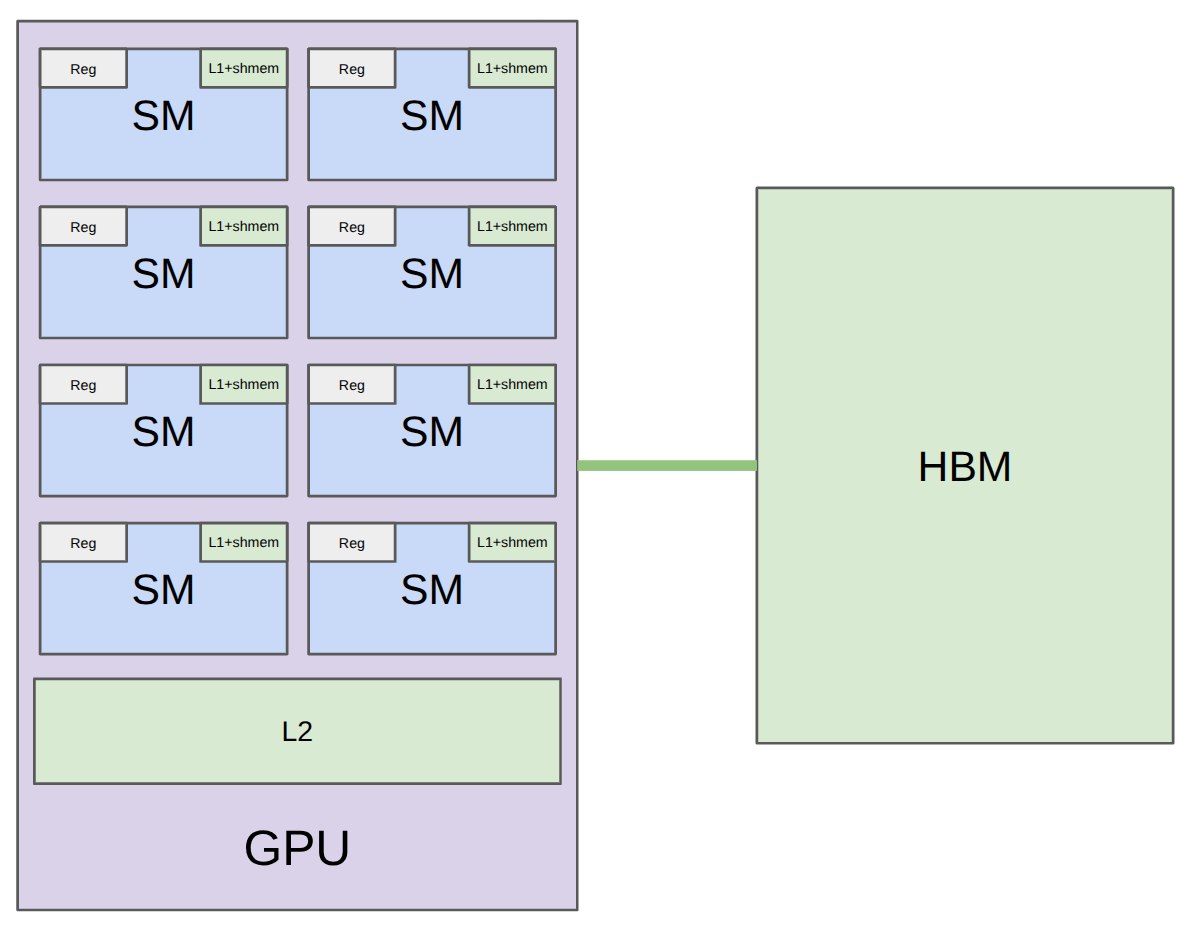
GPU 可以粗略理解为很多 Streaming Multiprocessors(SMs)组成的并行机器。每个 SM 有自己的 registers、L1 cache/shared memory;整张卡还有 L2 cache 和 HBM。
讲义给出 A100、H100、B200 的对比:
| Accelerator | A100 | H100 | B200 |
|---|---|---|---|
| # SMs | 108 | 132 | 148 |
| Register size per SM | 256 KB | 256 KB | 256 KB |
| L1 cache + shared memory per SM | 192 KB | 256 KB | 256 KB |
| L2 cache size | 40 MB | 50 MB | 96-126 MB |
| HBM size | 80 GB | 80 GB | 192 GB |
| Register bandwidth | ~116 TB/s | ~401 TB/s | ~447 TB/s |
| L1/shared memory bandwidth | ~19 TB/s | ~33 TB/s | ~19 TB/s |
| L2 bandwidth | ~5-8 TB/s | ~12 TB/s | ~9 TB/s |
| HBM bandwidth | 2 TB/s | 3.35 TB/s | 8 TB/s |
性能优化中最重要的直觉之一是:越靠近计算单元的存储越快,但容量越小。
- Registers:最快,线程私有。
- Shared memory / L1:很快,一个 thread block 内共享。
- L2:整张 GPU 共享。
- HBM:容量大,但相对慢。
所以 kernel 优化常常是在做一件事:减少 HBM 访问,把能复用的数据搬到 shared memory 或 registers。
1.2 GPU 编程模型
CUDA/PTX 的基本抽象如下:
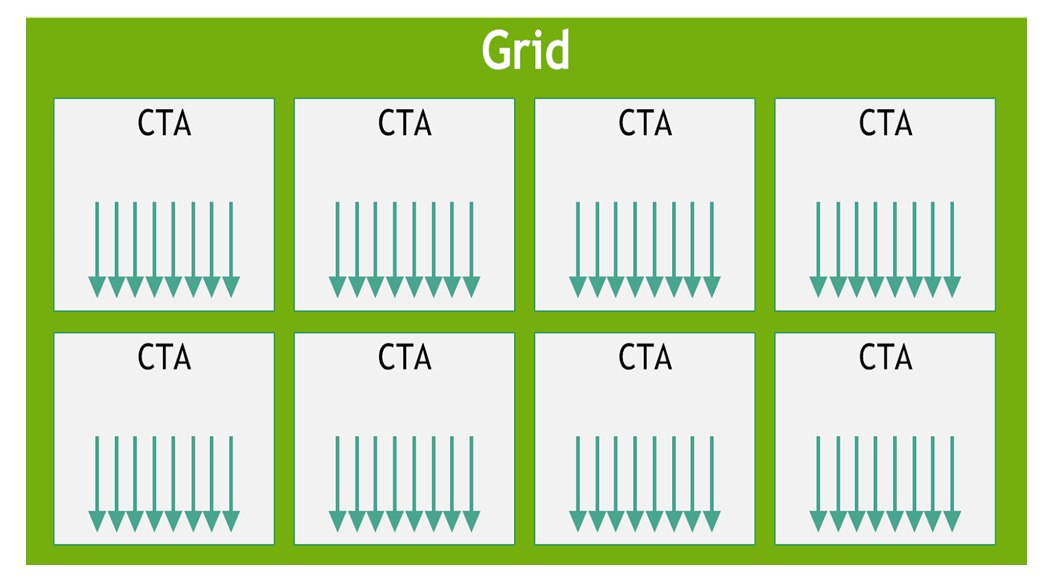
- Thread:执行一小部分数据上的代码。
- Thread block / CTA:一组 threads,通常能共享 shared memory。
- Grid:多个 thread blocks 的集合。
对 elementwise 操作,例如 GeLU,最自然的想法是:
for i in 0, ..., N - 1:
    y[i] = gelu(x[i])
在 GPU 上,可以让很多 threads 同时处理不同的 i。
但对于 softmax、row sum、matrix multiplication 这类操作,多个元素之间需要通信。例如 softmax 需要一整行的 max 和 sum,matmul 会重复使用 A 的行 tile 和 B 的列 tile。这时 thread block 的价值就出现了:一个 block 内的 threads 可以共享数据,协作完成 reduction 或 tiling。
在 Triton 中,你通常不是直接描述“每个 thread 做什么”,而是描述“每个 program / block 做什么”。
1.3 编程模型与硬件细节
编程模型保证 correctness,但 performance 取决于硬件细节。这里重点回顾五个概念。
1.3.1 Warps
一个 warp 通常包含 32 个 threads。同一个 warp 内的 threads 以 lockstep 方式执行同一条指令。
如果 warp 内不同 threads 走不同分支,就会出现 control divergence。例如一部分 threads 执行 if,另一部分执行 else,硬件需要串行执行这些路径,性能会下降。
直觉:
- 好情况:warp 中 32 个 threads 做相同类型的工作。
- 坏情况:同一个 warp 内分支严重不一致。
1.3.2 Warp occupancy
Occupancy 描述一个 SM 上同时能驻留多少 warps。它受 registers、shared memory、最大 warp 数等资源限制。
原代码中有一个 occupancy 计算示例:
num_threads_per_block = 128
num_registers_per_thread = 160

max_registers = 65536
max_warps = 64

num_registers_per_block = num_threads_per_block * num_registers_per_thread
num_blocks = max_registers // num_registers_per_block
num_warps = num_blocks * num_threads_per_block / 32
occupancy = num_warps / max_warps
这里每个 block 需要:
128 threads * 160 registers/thread = 20480 registers/block
一个 SM 有 65536 registers,所以最多同时放下:
65536 // 20480 = 3 blocks
每个 block 有:
128 / 32 = 4 warps
所以一共:
3 * 4 = 12 warps
如果硬件最多允许 64 concurrent warps,则 occupancy 是:
12 / 64 = 18.75%
低 occupancy 不一定坏。如果每个 thread 做了更多有用工作、减少了 HBM 访问,低 occupancy 也可能更快。关键是 benchmark。
1.3.3 Bank conflicts
Shared memory 分成 32 个 banks,每个 bank 每个 cycle 通常只能服务一次访问。如果一个 warp 内多个 threads 访问同一个 bank 的不同地址,就会发生 bank conflict,访问被串行化。
最坏情况示例:矩阵按行连续存储,32 个 threads 同时访问同一列。因为每一行跨度刚好覆盖所有 banks,同一列可能落在同一个 bank 上,于是出现 32-way bank conflict。
常见解决思路是 swizzling,即改变 shared memory 中的布局,例如用 row xor col 之类的方式打散 bank 访问。
1.3.4 Memory coalescing
当一个 warp 的 32 个 threads 访问 HBM 时,硬件会尽量把访问合并成 128 bytes 的 memory transaction。
如果 32 个 threads 访问连续的 32 个 float32:
32 * 4 bytes = 128 bytes
这就是理想的 coalesced access。反过来,如果 threads 访问分散地址,就需要更多 transactions,带宽利用率会下降。
1.3.5 Block occupancy
Thread blocks 会以 waves 的形式调度到 SMs 上。比如 B200 有 148 个 SMs,如果启动 160 个 blocks:
- 第一波:148 个 blocks 填满 148 个 SMs。
- 第二波:只剩 12 个 blocks,很多 SMs 空闲。
这叫 wave quantization problem。一个简单优化方向是让 blocks 数量尽量能较好匹配 SM 数量。
1.4 Benchmarking:测端到端时间
benchmarking 测的是某个操作的 wall-clock time,不告诉你时间花在哪里。
它适合回答:
- 哪个实现更快?
- 性能如何随维度变化?
比如我们用矩阵乘法做一个例子。
run_operation2() 会先创建两个随机矩阵,然后返回一个闭包:
def run_operation2(dim: int, operation: Callable) -> Callable:
    x = torch.randn(dim, dim, device=cuda_if_available())
    y = torch.randn(dim, dim, device=cuda_if_available())
    return lambda: operation(x, y)
这样 benchmark 时只测 operation(x, y),不把 tensor 创建时间混进去。
核心 benchmark 函数如下:
def benchmark(run: Callable, num_warmups: int = 1, num_trials: int = 3) -> float:
    for _ in range(num_warmups):
        run()
    torch.cuda.synchronize()

    times: list[float] = []
    for trial in range(num_trials):
        start_event = torch.cuda.Event(enable_timing=True)
        end_event = torch.cuda.Event(enable_timing=True)

        start_event.record()
        run()
        end_event.record()

        torch.cuda.synchronize()
        times.append(start_event.elapsed_time(end_event))

    return mean(times)
def mean(xs: list[float]) -> float:
    return sum(xs) / len(xs)

matmul = run_operation2(dim=1024, operation=lambda a, b: a @ b)
result = benchmark(matmul)
result
1.9985067049662273
这里计时单位是ms
几个关键点:
- Warmup:第一次运行可能包含编译、初始化、cache cold start,不代表 steady state。
torch.cuda.synchronize():CUDA kernel launch 是异步的;不 synchronize 会测到 CPU launch 时间,而不是 GPU 真正执行时间。这个函数会使得cpu等待gpu的操作做完- CUDA events:比 Python
time.time()更适合测 GPU kernel elapsed time。 - 多次 trials:捕捉方差,避免被偶然波动误导。
1.5 Profiling:看时间花在哪里
Benchmark 告诉你“多快”,profiling 告诉你“为什么这么快/慢”。
def profile(run: Callable, num_warmups: int = 1):
    # Warmup
    for _ in range(num_warmups):
        run()
    torch.cuda.synchronize()

    # Run the code with the profiler
    with torch.profiler.profile(
            # activities=[ProfilerActivity.CPU, ProfilerActivity.CUDA],
            activities=[ProfilerActivity.CPU, ProfilerActivity.CUDA],
            record_shapes=True,
            experimental_config=torch._C._profiler._ExperimentalConfig(verbose=True)) as prof:
        run()
        torch.cuda.synchronize()

    # Print out table
    table = prof.key_averages().table(sort_by="cuda_time_total",
                                      max_name_column_width=100,
                                      row_limit=10)
    # Append to profiles.txt
    with open("profiles.txt", "a") as f:
        f.write(f"Profile at {time.ctime()}:\n")
        f.write(table)
        f.write("\n\n")
    return table
add_profile = profile(run_operation2(dim=2048, operation=lambda a, b: a + b))
matmul_profile = profile(run_operation2(dim=2048, operation=lambda a, b: a @ b)) # @stepover
print(add_profile)
print(matmul_profile)
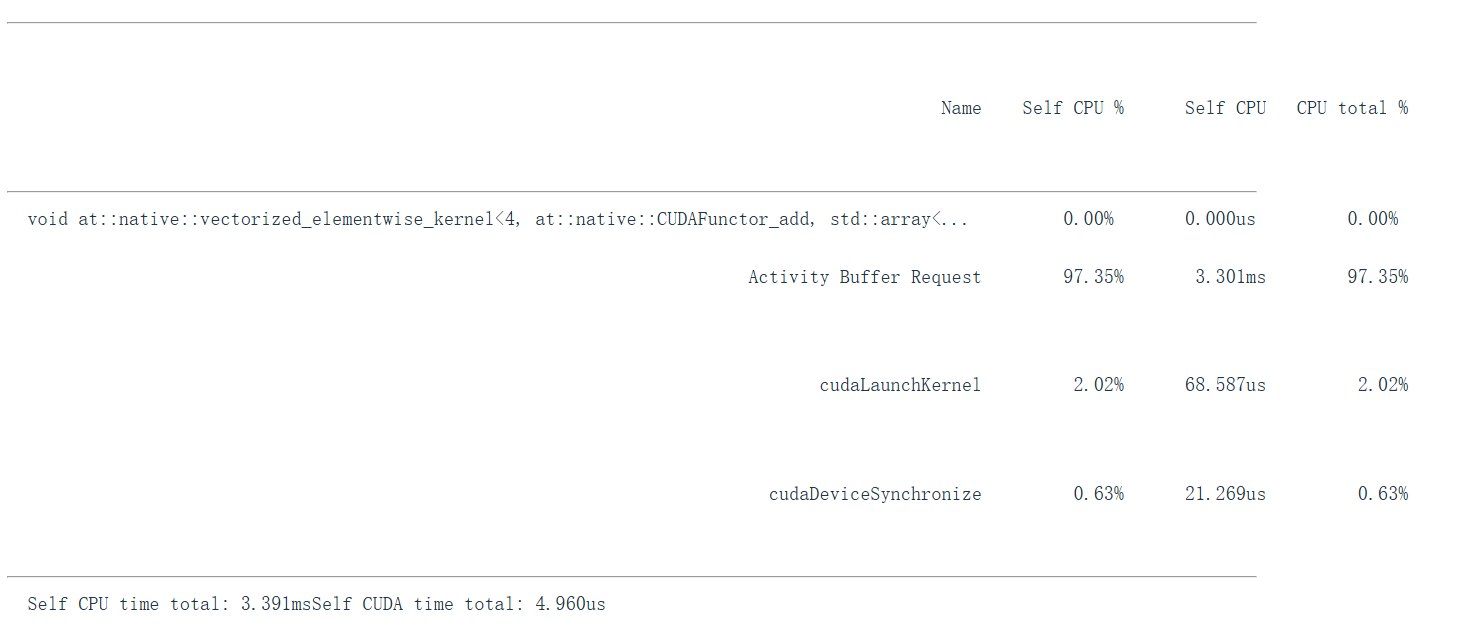
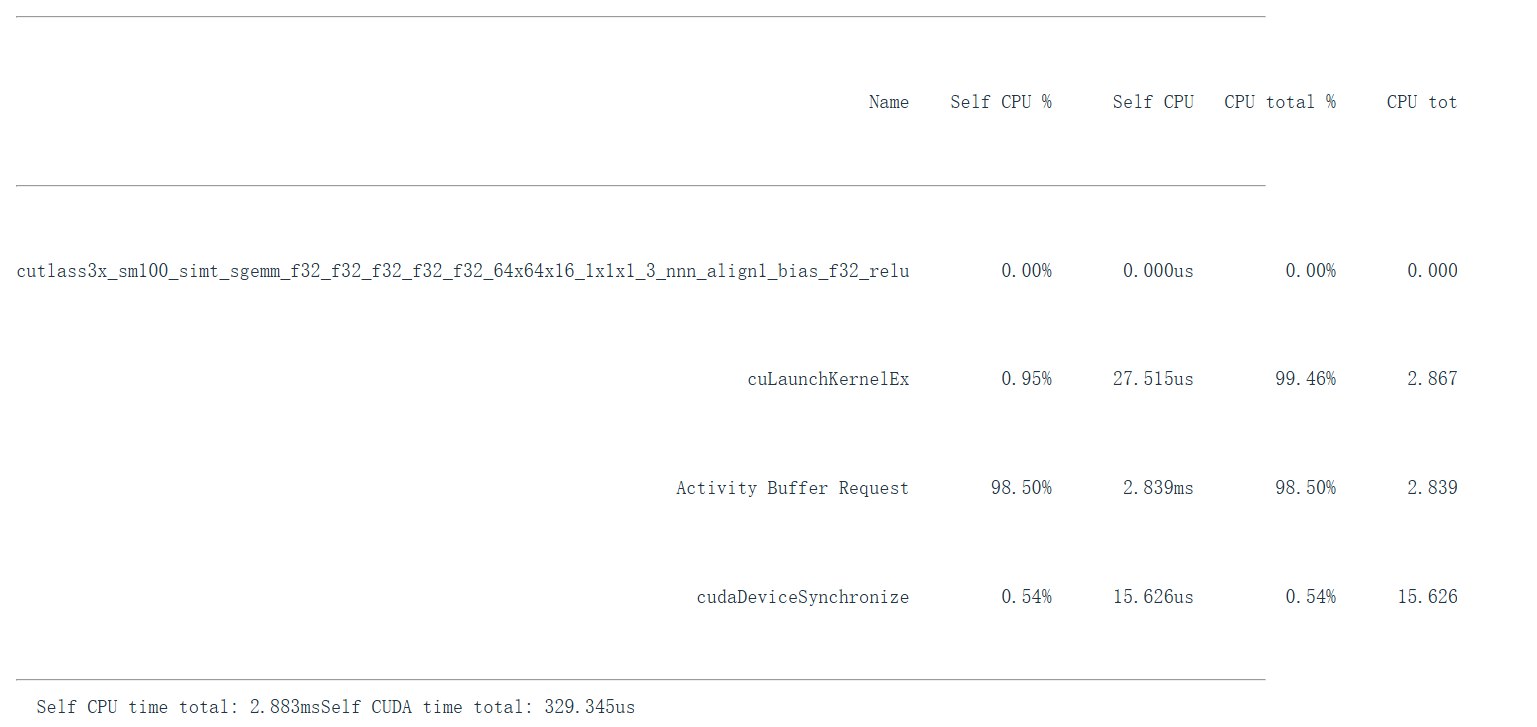
profiling() 分别 profile:
add(dim=2048):elementwise add。matmul(dim=2048):大矩阵乘法。matmul(dim=128):小矩阵乘法。
我们可以在表里看到实际被调用的 CUDA kernel 名称。不同维度可能触发不同 kernel。对于 matmul,kernel 名称可能包含:
cutlass:NVIDIA CUDA linear algebra library。sm100:对应 Blackwell 架构。f32:float32。64x64x16:tile shape。
1.6 GeLU:naive、builtin 与 compiled
接下来用 GeLU activation function 展示 kernel fusion 的重要性。
1.6.1 GeLU 公式
代码使用 tanh approximation:
def naive_gelu(x: torch.Tensor):
    return 0.5 * x * (1 + torch.tanh(0.79788456 * (x + 0.044715 * x * x * x)))
PyTorch builtin 版本:
def builtin_gelu(x: torch.Tensor):
    return torch.nn.functional.gelu(x, approximate="tanh")
再用 torch.compile() 编译 naive 版本:
compiled_gelu = torch.compile(naive_gelu)
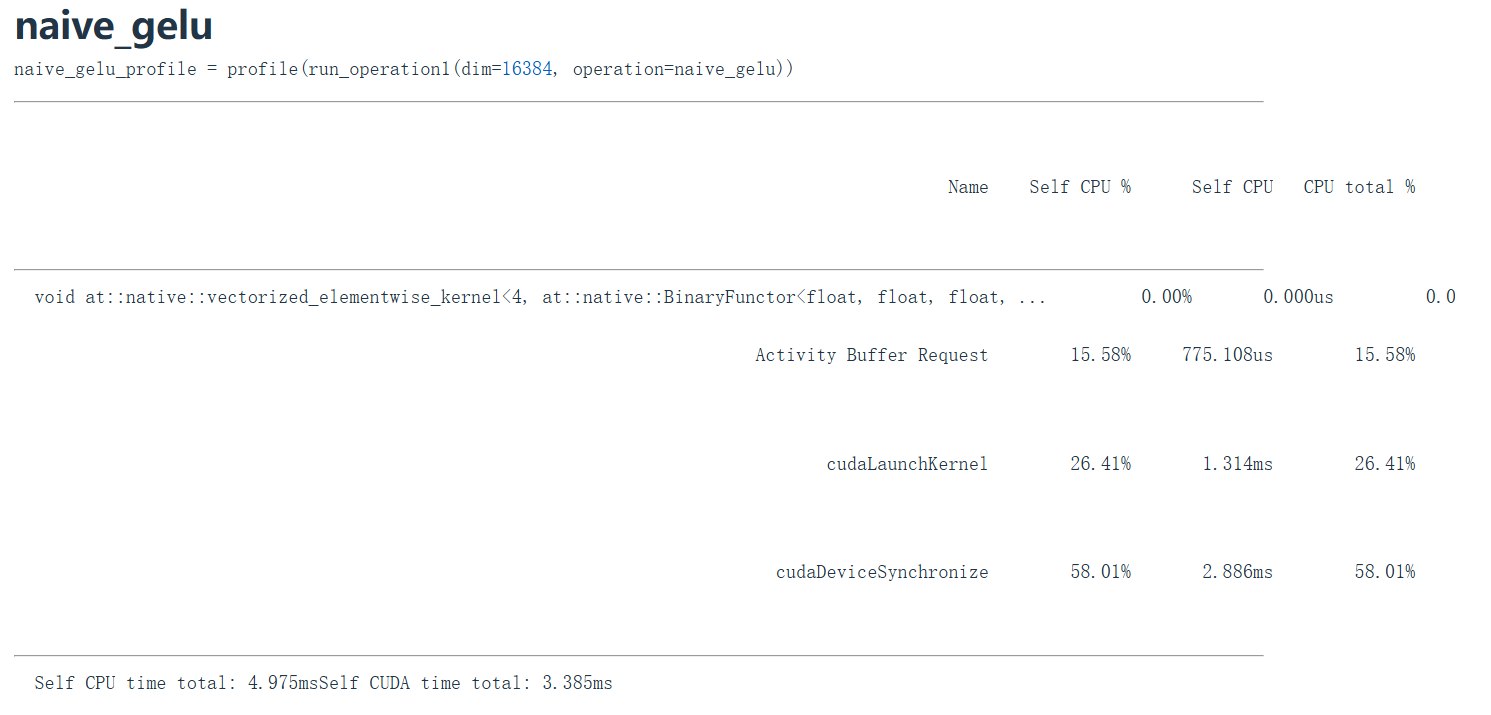
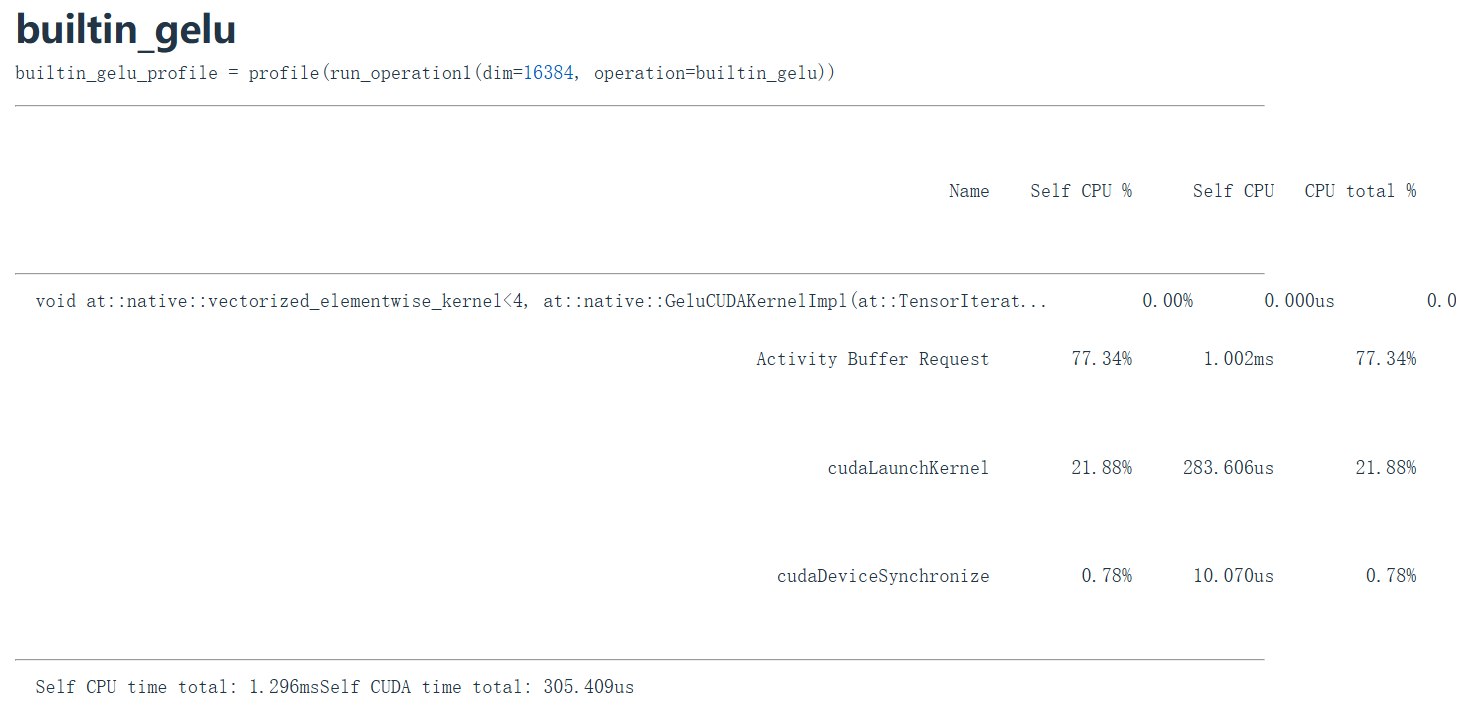
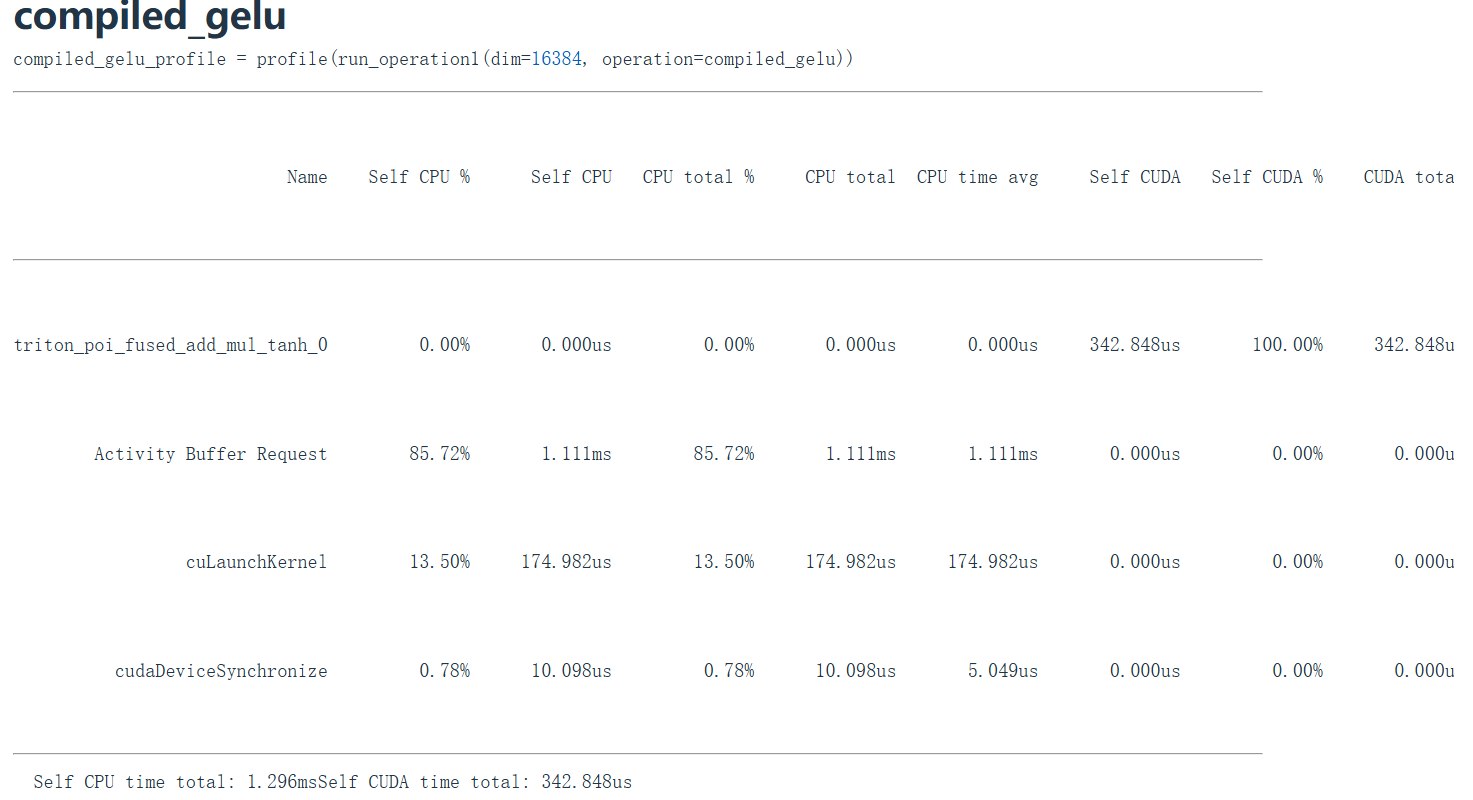
compile 和 builtin 的版本比 naive的快不少
1.6.2 为什么 naive 慢
naive_gelu() 看起来是一行公式,但 PyTorch eager mode 可能会把里面的乘法、加法、tanh 等拆成多个 CUDA kernels。
每个 kernel 都可能需要:
- 从 HBM 读输入。
- 做一点计算。
- 把中间结果写回 HBM。
这就是 no fusion 的代价。
Builtin 和 compiled 版本通常能把多个 elementwise operations 融合成一个 kernel:
- 从 HBM 读一次。
- 在 registers 中完成中间计算。
- 写回 HBM 一次。
这就是 kernel fusion。
二、Triton
2.1 Triton 编程模型
CUDA 的思路是描述每个 thread 做什么。优点是控制非常细,缺点是你要管理更多底层细节。
Triton 的思路是描述每个 program / block 做什么。你通常写的是一段向量化程序:
- 根据
program_id找到当前 block 负责的数据范围。 - 用
tl.arange生成 block 内 offsets。 - 用
tl.load从 global memory 读入一组数据。 - 在 block 内做计算、reduction 或 dot。
- 用
tl.store写回 global memory。
这非常适合从 PyTorch 过渡到自定义 GPU kernel:你不用一开始就手写 CUDA thread-level 逻辑,但能显式控制 memory traffic、tiling 与 fusion。
2.2 示例
2.2.1 C = A + B
@triton.jit
def add_kernel(
    x_ptr,  # 第一个输入张量的内存指针
    y_ptr,  # 第二个输入张量的内存指针
    output_ptr, # 输出张量的内存指针
    n_elements, # 数组里的元素总个数
    BLOCK_SIZE: tl.constexpr, # 每个 Block 处理的数据量,必须是常量
):
    # 1. 获取当前 Block 的 ID
    pid = tl.program_id(axis=0)

    # 2. 计算当前 Block 应该处理的数据的起始位置(偏移量)
    # 比如 pid=0 时,处理 0~255;pid=1 时,处理 256~511
    block_start = pid * BLOCK_SIZE

    # 3. 生成当前 Block 内每个元素的具体位置 (0 到 BLOCK_SIZE-1) + 起始位置
    offsets = block_start + tl.arange(0, BLOCK_SIZE)

    # 4. 创建 Mask(掩码),防止最后一个 Block 越界
    mask = offsets < n_elements

    # 5. 从 GPU 内存 (DRAM) 加载数据到 GPU 缓存 (SRAM)
    x = tl.load(x_ptr + offsets, mask=mask)
    y = tl.load(y_ptr + offsets, mask=mask)

    # 6. 执行相加操作
    output = x + y

    # 7. 把结果写回 GPU 内存
    tl.store(output_ptr + offsets, output, mask=mask)
def add(x: torch.Tensor, y: torch.Tensor):
    # 确保输入在 GPU 上,且是连续的
    assert x.is_cuda and y.is_cuda
    assert x.is_contiguous() and y.is_contiguous()

    n_elements = x.numel() # 获取元素总数

    # 创建一个空的 Tensor 来装结果
    output = torch.empty_like(x)

    # 设置 BLOCK_SIZE
    BLOCK_SIZE = 1024

    # 计算需要多少个 Block (向上取整)
    # triton.cdiv 是一个方便的向上取整函数,等价于 (n_elements + BLOCK_SIZE - 1) // BLOCK_SIZE
    grid = lambda meta: (triton.cdiv(n_elements, meta['BLOCK_SIZE']),)

    # 调用 Kernel
    add_kernel[grid](
        x, y, output, n_elements,
        BLOCK_SIZE=BLOCK_SIZE
    )

    return output
# 生成测试数据
size = 98432 # 随便写一个奇怪的数字,测试 Mask 有没有生效
x = torch.rand(size, device='cuda')
y = torch.rand(size, device='cuda')

# 用我们的 Triton 函数计算
output_triton = add(x, y)

# 用 PyTorch 自带的加法计算(作为标准答案)
output_torch = x + y

# 对比结果是否一致
print(f"最大误差: {torch.max(torch.abs(output_triton - output_torch))}")
if torch.allclose(output_triton, output_torch):
    print("✅ Triton 代码执行正确!")
else:
    print("❌ 结果不匹配!")
最大误差: 0.0
✅ Triton 代码执行正确!
2.2.2 GeLU
@triton.jit
def triton_gelu_kernel(x_ptr, y_ptr, num_elements, BLOCK_SIZE: tl.constexpr):
    pid = tl.program_id(axis=0)
    start = pid * BLOCK_SIZE

    offsets = start + tl.arange(0, BLOCK_SIZE)
    msk = offsets < num_elements

    x = tl.load(x_ptr + offsets, mask=msk)

    a = 0.79788456 * (x + 0.044715 * x * x * x)
    exp = tl.exp(2 * a)
    tanh = (exp - 1) / (exp + 1)
    y = 0.5 * x * (1 + tanh)

    tl.store(y_ptr + offsets, y, mask=msk)
def triton_gelu(x: torch.Tensor):
    assert x.is_cuda
    assert x.is_contiguous()

    y = torch.empty_like(x)

    num_elements = x.numel()
    BLOCK_SIZE = 1024
    num_blocks = triton.cdiv(num_elements, BLOCK_SIZE)

    kernel = triton_gelu_kernel[(num_blocks,)](
        x, y, num_elements, BLOCK_SIZE=BLOCK_SIZE
    )

    output_ptx("triton_gelu", kernel)
    return y
BLOCK_SIZE = 1024:每个 Triton program 处理 1024 个元素。triton.cdiv(num_elements, BLOCK_SIZE):向上取整,保证尾部不足一个 block 的元素也被覆盖。kernel[(num_blocks,)](...):Triton kernel launch syntax。
2.2.3 Softmax row-wise reduction
Softmax 是 attention 和概率生成中的核心操作。对每一行:
[0, 0, 0]      -> [1/3, 1/3, 1/3]
[1, 1, -inf]   -> [1/2, 1/2, 0]
稳定 softmax 通常写成:
y = exp(x - max(x)) / sum(exp(x - max(x)))
Naive softmax 的 memory traffic:
def naive_softmax(x: torch.Tensor):
    M, N = x.shape

    x_max = x.max(dim=1)[0]
    x = x - x_max[:, None]
    numerator = torch.exp(x)
    denominator = numerator.sum(dim=1)
    y = numerator / denominator[:, None]
    return y
这会产生多次中间 tensor:
- 求 row max。
- 减 max。
- exp。
- row sum。
- normalize。
注释里估算总访问约为:
5MN + M reads, 3MN + 2M writes
理想情况下,如果一个 fused kernel 完成所有事情,只需要大约:
MN reads, MN writes
Triton softmax 的结构
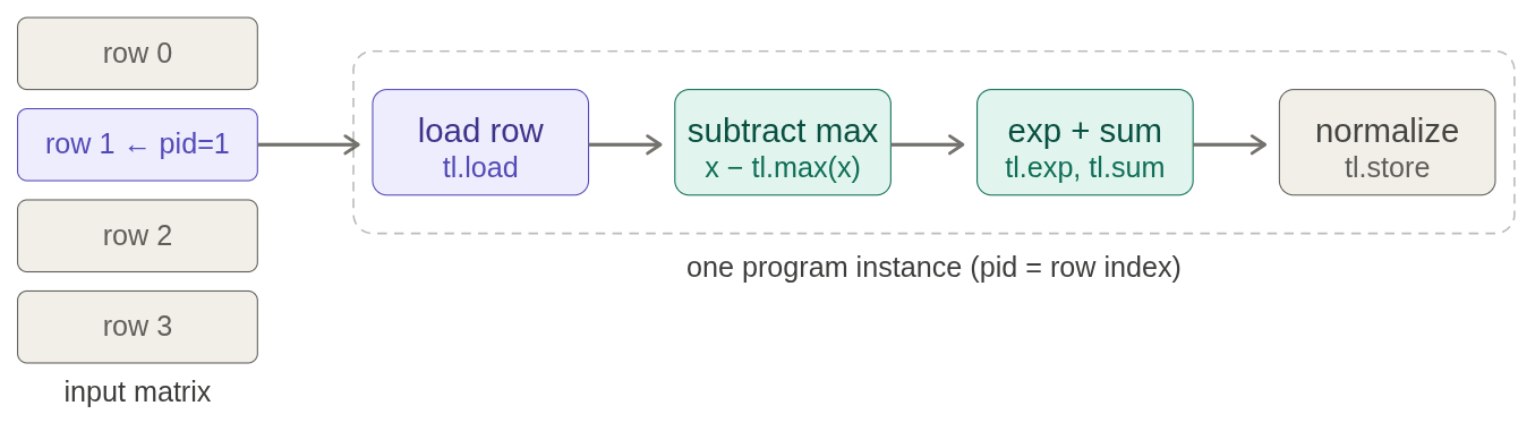
Kernel:
@triton.jit
def triton_softmax_kernel(x_ptr, y_ptr, x_row_stride, y_row_stride, num_cols, BLOCK_SIZE: tl.constexpr):
    row_idx = tl.program_id(axis=0)
    col_offsets = tl.arange(0, BLOCK_SIZE)

    # 计算地址,存数
    x_start_ptr = x_ptr + row_idx * x_row_stride
    x_ptrs = x_start_ptr + col_offsets
    x_row = tl.load(x_ptrs, mask=col_offsets < num_cols, other=float("-inf"))

    # 计算该行的softmax
    x_row = x_row - tl.max(x_row, axis=0)
    numerator = tl.exp(x_row)
    denominator = tl.sum(numerator, axis=0)
    y_row = numerator / denominator

    # 计算地址,存数
    y_start_ptr = y_ptr + row_idx * y_row_stride
    y_ptrs = y_start_ptr + col_offsets
    tl.store(y_ptrs, y_row, mask=col_offsets < num_cols)
other=float("-inf") 的作用是 padding。因为 BLOCK_SIZE 可能大于实际列数 num_cols,越界位置在 max 中应该不影响结果,所以用 -inf。
然后包装一下:
def triton_softmax(x: torch.Tensor):
    y = torch.empty_like(x)

    M, N = x.shape
    block_size = triton.next_power_of_2(N)
    num_blocks = M

    triton_softmax_kernel[(M,)](
        x_ptr=x, y_ptr=y,
        x_row_stride=x.stride(0), y_row_stride=y.stride(0),
        num_cols=N, BLOCK_SIZE=block_size
    )

    return y
辅助函数:
def check_equal_2d(f1, f2):
    x = torch.randn(2048, 2048, device=cuda_if_available())
    y1 = f1(x)
    y2 = f2(x)
    assert torch.allclose(y1, y2, atol=1e-6)
实测:
x = torch.tensor([[5., 5, 5], [0, 0, 100]], device="cuda")
print(naive_softmax(x))
print(triton_softmax(x))

check_equal_2d(naive_softmax, naive_softmax)
check_equal_2d(naive_softmax, triton_softmax)
tensor([[3.3333e-01, 3.3333e-01, 3.3333e-01],
        [3.7835e-44, 3.7835e-44, 1.0000e+00]], device='cuda:0')
tensor([[3.3333e-01, 3.3333e-01, 3.3333e-01],
        [3.7835e-44, 3.7835e-44, 1.0000e+00]], device='cuda:0')
2.2.4 Matmul + ReLU 与 tiling
Matrix multiplication 是深度学习的核心:
A: M x K
B: K x N
C: M x N
Naive matmul 对每个输出元素 C[m, n]:
for k in 0..K-1:
    C[m, n] += A[m, k] * B[k, n]
问题是 HBM 访问太多。计算相邻输出元素时,会重复读取 A 或 B 的相同元素。
理想思路是把 A 和 B 都读入 shared memory 再计算,但完整矩阵通常放不下。实际做法是 tiling:
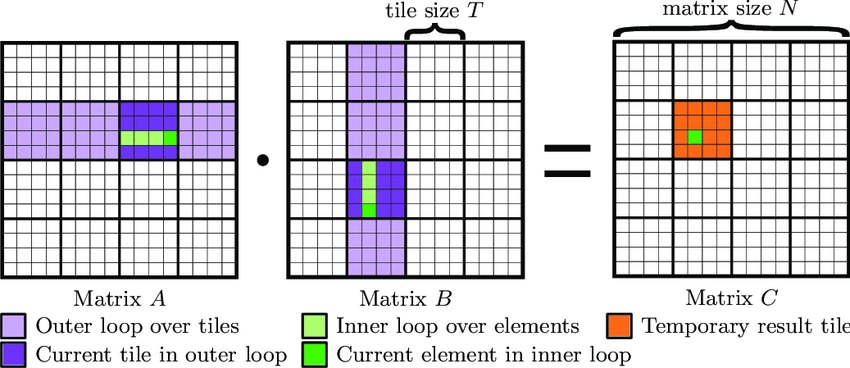
核心想法:
- 把输出矩阵 C 划分成
BLOCK_M x BLOCK_N的 output tiles。 - 每个 Triton program 负责一个 output tile。
- 沿 K 维度分块,每次加载 A 的一个 tile 和 B 的一个 tile。
- 用
tl.dot(a, b)累加 partial sums。 - 最后应用 ReLU,并把 output tile 写回 HBM。
PyTorch baseline
def naive_matmul_relu(x: torch.Tensor, y: torch.Tensor):
    return torch.nn.functional.relu(x @ y)
Triton 实现
@triton.jit
def matmul_relu_kernel(
    # 矩阵指针
    a_ptr, b_ptr, c_ptr,
    # 矩阵维度
    M, N, K,
    # 内存步长 (Stride)
    stride_am, stride_ak,
    stride_bk, stride_bn,
    stride_cm, stride_cn,
    # Block 大小配置 (常量)
    BLOCK_M: tl.constexpr, BLOCK_N: tl.constexpr, BLOCK_K: tl.constexpr,
):
    # 用一个 2D 网格来启动 Block。
    # pid_m 代表负责 C 的哪一行块,pid_n 代表负责哪一列块。
    pid_m = tl.program_id(axis=0)
    pid_n = tl.program_id(axis=1)

    # 计算负责的这个 Block,在 M 和 N 维度上的绝对位置
    # 比如 pid_m=0,负责 0~127 行;pid_m=1,负责 128~255 行
    offs_m = pid_m * BLOCK_M + tl.arange(0, BLOCK_M)
    offs_n = pid_n * BLOCK_N + tl.arange(0, BLOCK_N)
    offs_k = tl.arange(0, BLOCK_K) # K 维度每次的偏移

    # 计算二维内存指针偏移量(广播)
    # A 指针
    a_ptrs = a_ptr + (offs_m[:, None] * stride_am + offs_k[None, :] * stride_ak)
    # B 指针
    b_ptrs = b_ptr + (offs_k[:, None] * stride_bk + offs_n[None, :] * stride_bn)

    # 准备累加器 C,大小是 BLOCK_M x BLOCK_N
    accumulator = tl.zeros((BLOCK_M, BLOCK_N), dtype=tl.float32)

    # K 维度循环
    for k in range(0, K, BLOCK_K):
        # 搬 A 和 B 的一块进入 SRAM
        a = tl.load(a_ptrs)
        b = tl.load(b_ptrs)

        # 矩阵相乘,并累加
        # tl.dot 会在底层调用 GPU 的 Tensor
        accumulator = tl.dot(a, b, accumulator)

        # 指针往前移动 BLOCK_K 步,准备下一次循环搬砖
        # 注意这里a的stride是a_k,a_k = N, 所以相当于每次a往右滑动 BLOCK_K 距离
        a_ptrs += BLOCK_K * stride_ak
        # 注意这里b的stride是b_k, b_k = 1, 所以相当于每次b往右滑动 1 距离
        b_ptrs += BLOCK_K * stride_bk

    accumulator = tl.maximum(accumulator, 0.0)

    # 循环结束,把算好的这块 C 写回显存 (DRAM)
    c_ptrs = c_ptr + (offs_m[:, None] * stride_cm + offs_n[None, :] * stride_cn)
    tl.store(c_ptrs, accumulator)
def matmul_relu(a: torch.Tensor, b: torch.Tensor):
    # 获取维度
    M, K = a.shape
    K2, N = b.shape
    assert K == K2, "矩阵A的列数必须等于矩阵B的行数"

    # 申请输出空间
    c = torch.empty((M, N), device=a.device, dtype=torch.float16)

    # 切块大小
    BLOCK_M = 128
    BLOCK_N = 128
    BLOCK_K = 32

    # 启动二维网格:M方向需要几个Block,N方向需要几个Block
    grid = (triton.cdiv(M, BLOCK_M), triton.cdiv(N, BLOCK_N))

    matmul_relu_kernel[grid](
        a, b, c,
        M, N, K,
        a.stride(0), a.stride(1),
        b.stride(0), b.stride(1),
        c.stride(0), c.stride(1),
        BLOCK_M=BLOCK_M, BLOCK_N=BLOCK_N, BLOCK_K=BLOCK_K,
    )
    return c

def naive_matmul_relu(x: torch.Tensor, y: torch.Tensor):
    return torch.nn.functional.relu(x @ y)

# --- 测试代码 ---
torch.manual_seed(0)
# 为了避免越界(Mask)的复杂逻辑,我们这里用能被 Block 整除的维度测试
M, N, K = 1024, 1024, 1024
a = torch.randn((M, K), device='cuda', dtype=torch.float16)
b = torch.randn((K, N), device='cuda', dtype=torch.float16)

triton_output = matmul_relu(a, b)
torch_output = naive_matmul_relu(a, b)
print(f"最大误差: {torch.max(torch.abs(triton_output - torch_output))}")
if torch.allclose(triton_output, torch_output, atol=1E-2, rtol=0):
    print("✅ Triton Matmul 代码执行正确!")
最大误差: 0.0
✅ Triton Matmul 代码执行正确!

说些什么吧!